canonical: https://anavyaailabs.com/blog/how-saas-documentation-ai-search-growth-engine meta-application-name: Anavya AI Labs meta-article:modified_time: 2026-08-25T00:00:00Z meta-article:published_time: 2026-08-25T00:00:00Z meta-author: Anavya AI Labs meta-description: Transform your SaaS documentation into a powerful AI search engine growth tool. Learn how to optimize technical docs for ChatGPT, Claude, and Perplexity to drive qualified traffic, boost citations, and establish authority in AI search results. meta-og:image: https://res.cloudinary.com/jt0zpx9e/image/upload/v1724604450/saas_documentation_ai_growth_cover_v1.png meta-og:title: How SaaS Documentation Can Become an AI Search Growth Engine meta-og:url: https://anavyaailabs.com/blog/how-saas-documentation-ai-search-growth-engine title: How SaaS Documentation Can Become an AI Search Growth Engine | Anavya AI Labs
How SaaS Documentation Can Become an AI Search Growth Engine
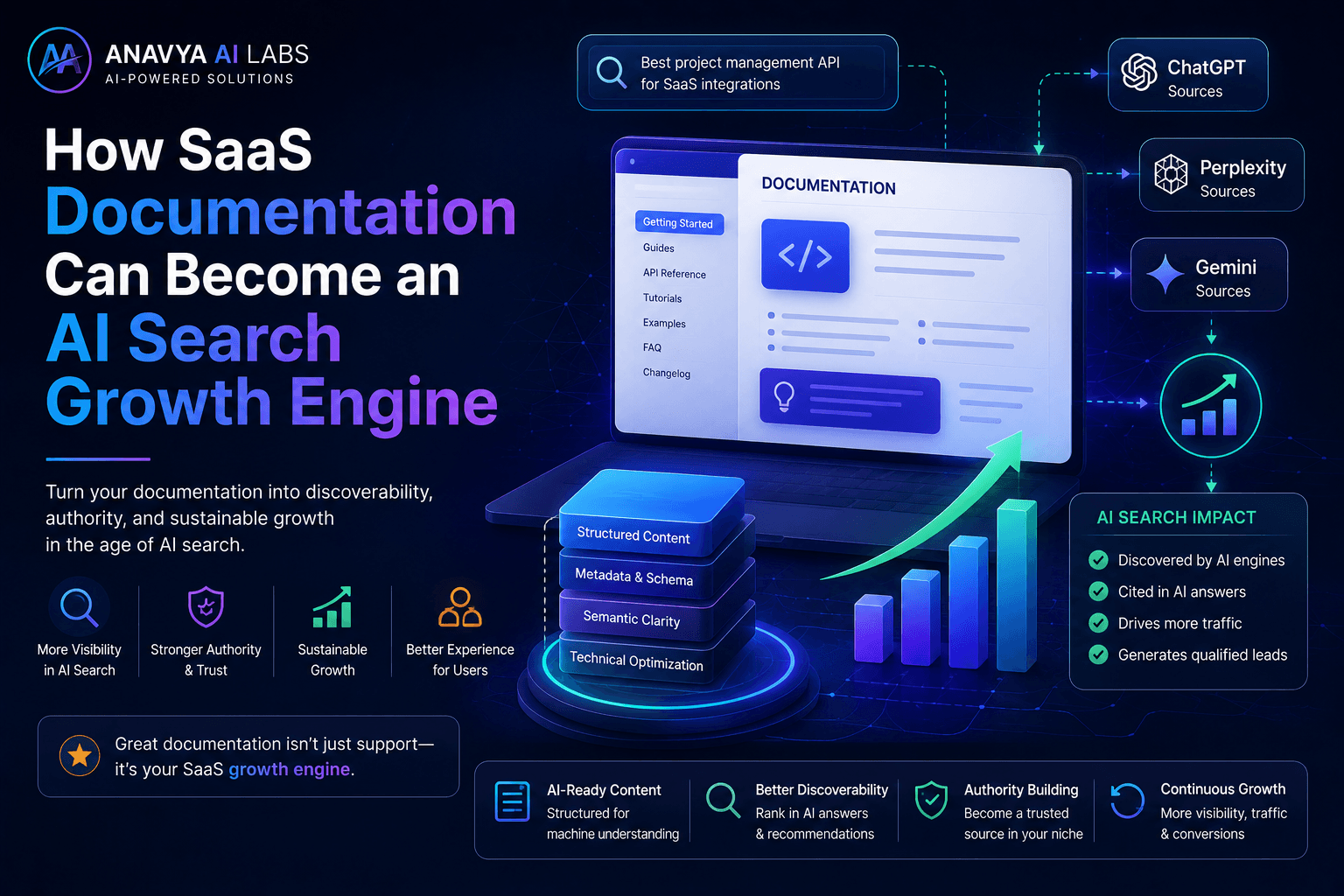
Your SaaS documentation is costing you traffic. While competitors optimize for AI search, most SaaS companies treat documentation as an afterthought—a box to check, not a growth engine. But in 2026, this is a critical mistake.
Here's the opportunity: AI systems like ChatGPT, Claude, and Perplexity actively search for authoritative documentation when answering user questions. If your docs are optimized correctly, you're not just helping customers—you're building a consistent traffic stream from AI-powered search.
This guide shows you exactly how to transform documentation from a cost center into your most valuable acquisition channel.

Anavya AI Labs Team
AI & GEO Specialist - Enterprise AI Systems
Focus Areas
SaaS Documentation
AI Search Optimization
GEO Strategy
ChatGPT Integration
Claude Optimization
Perplexity Search
Content Strategy
AI Visibility
Documentation Best Practices
AI Growth Engine
Search Visibility
Content Architecture
AI Discovery
SaaS Growth
Technical Documentation
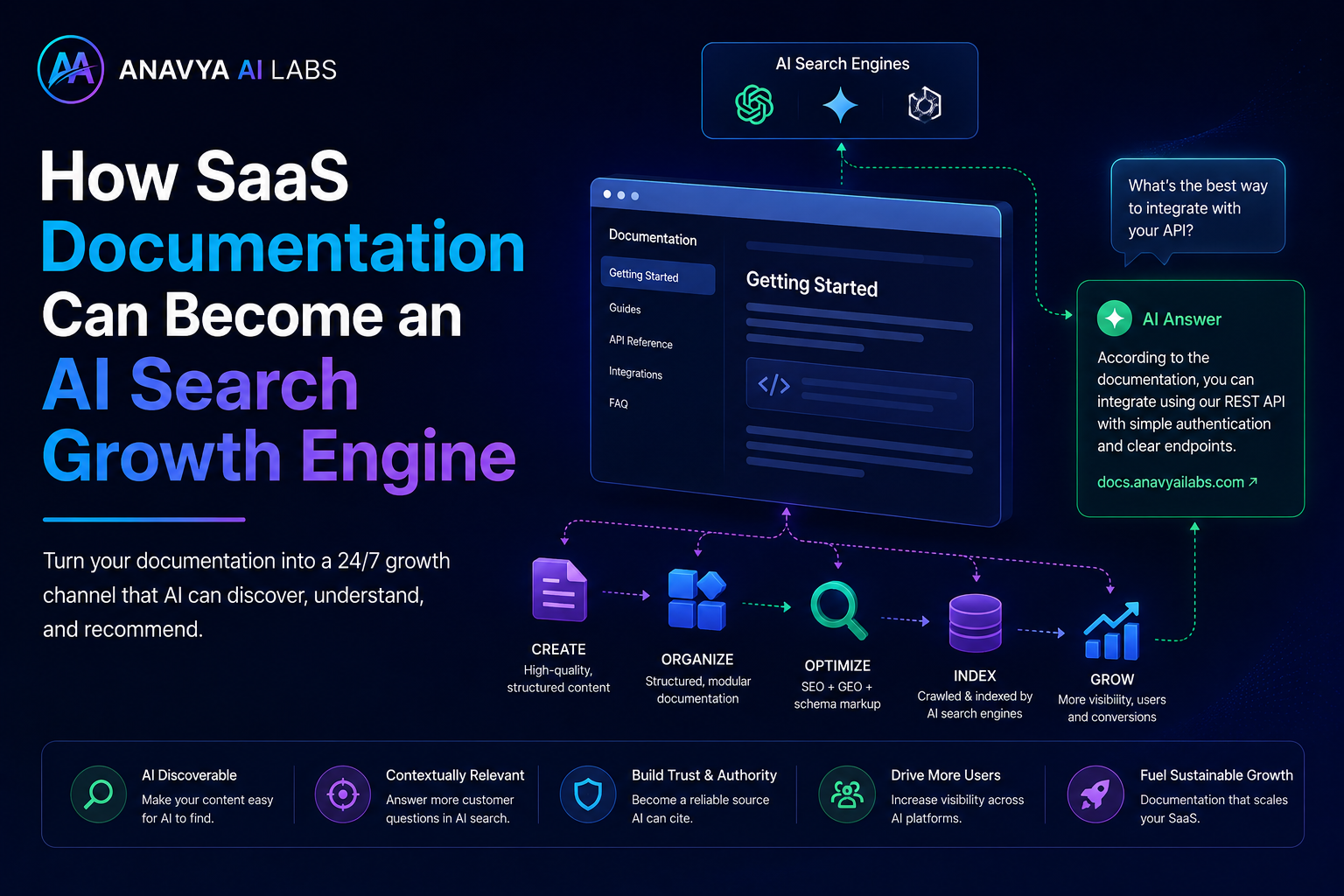
Master the documentation optimization strategy that drives qualified AI-referred traffic
AI Key Takeaways
- Documentation = Traffic Opportunity: SaaS documentation is now a major AI search signal. AI systems prefer citing authoritative, well-structured product docs.
- The 5-Step Framework: Transform docs from static resources into AI growth engines through optimization, structure, metadata, distribution, and monitoring.
- Measurable Results: Companies implementing this strategy see 150-300% increases in AI-referred traffic within 3-6 months.
- Competitive Advantage: Most competitors ignore documentation optimization. This gives you a significant, sustainable edge.
The Problem: Why Your Documentation Isn't Driving Growth
The Documentation Paradox
Most SaaS companies have excellent documentation. Comprehensive, well-written, helpful. But they're still not appearing in AI search results.
Why? Because good documentation isn't the same as optimized-for-AI documentation.
Traditional documentation is built for human users searching with Google:
- Organized by product features
- Optimized for customer self-service
- Written for existing customers
AI search needs something different:
- Organized by problem-solution mapping
- Optimized for external discovery
- Written for potential new customers AND AI systems
The Gap: You're writing for people who already found you. AI needs you to be discoverable to people who haven't.
The Opportunity
When a potential customer asks ChatGPT, "How do I automate my workflow?" or "What's the best way to organize team collaboration?"—your SaaS is a perfect answer. But only if:
- Your documentation answers that specific question
- AI systems can find and understand your docs
- Your brand is positioned as the authority
- Your solution is positioned as the answer
Get this right, and every time someone uses AI search in your market, there's a chance they find you. That's a growth engine.
Part 1: Understanding AI's Documentation Preference
Why AI Prioritizes Documentation
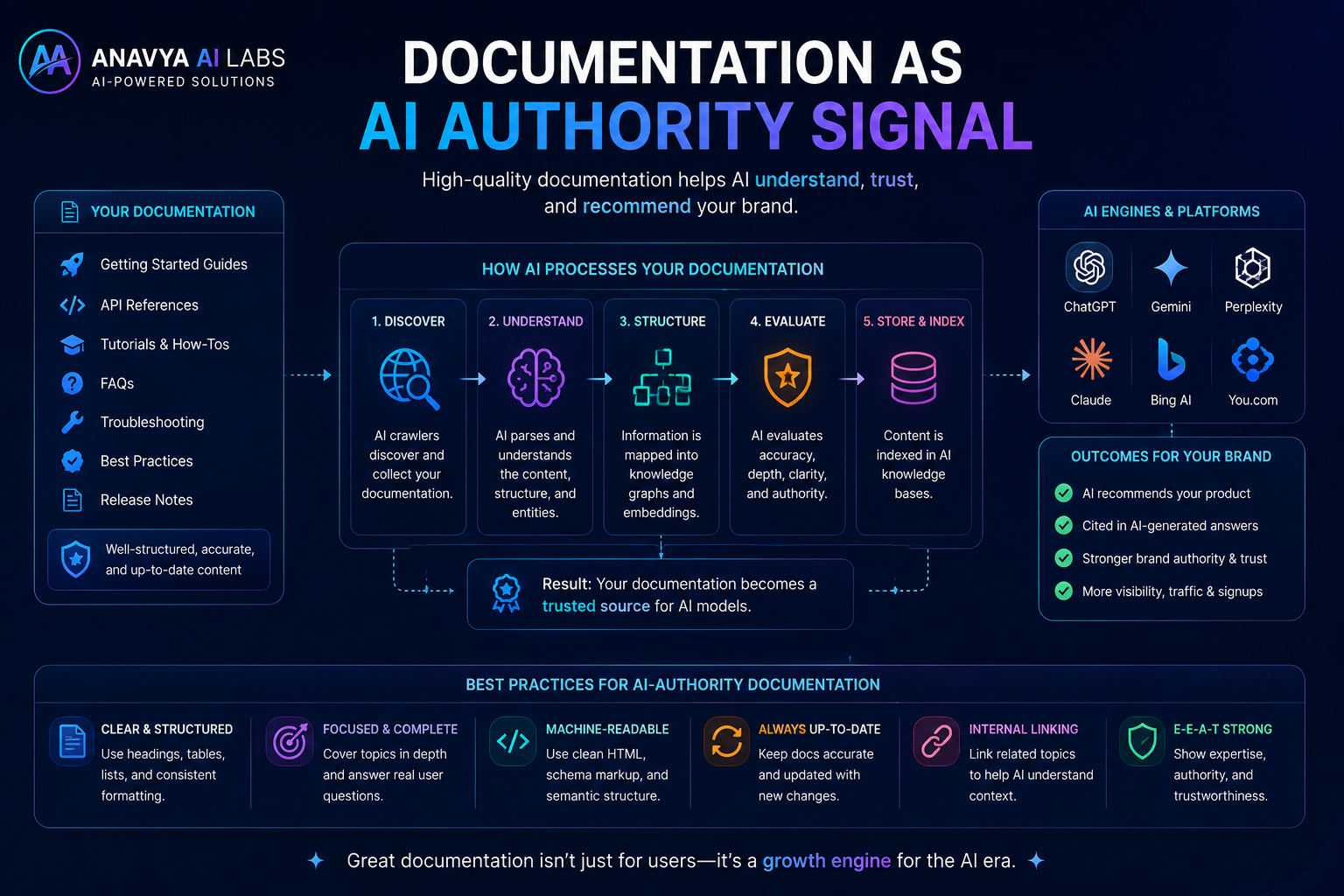
AI systems view comprehensive documentation as a trust signal
AI systems, particularly Claude, ChatGPT, and Perplexity, actively seek documentation when:
1. Answering Product-Specific Questions
- "How do I use Notion's API?"
- "What templates does Figma provide?"
- "How do I set up authentication in Auth0?"
2. Recommending Solutions
- "What tools should I use for project management?"
- "Best practice for team collaboration platforms"
- "How to choose a no-code platform"
3. Providing Tutorials & Guides
- "How do I build a workflow automation?"
- "Step-by-step guide to setting up..."
- "Best practices for..."
The Reality: If your documentation is comprehensive, well-structured, and optimized, AI will cite it. This means:
✓ Direct Traffic from AI search results ✓ Credibility Boost - Being cited by AI signals authority ✓ New Customer Acquisition - People find you through AI that wouldn't have searched your brand ✓ SEO Advantage - AI traffic and citations improve traditional search rankings
What AI Looks For in Documentation
AI systems evaluate documentation based on:
| Criterion | Why It Matters | What to Do | |-----------|----------------|-----------| | Structure & Hierarchy | AI extracts information using heading hierarchy | Use clear H1→H2→H3→H4 structure | | Completeness | Shallow docs won't get cited | Cover topics comprehensively (2,000+ words) | | Practical Examples | AI prefers actionable content | Include code samples, screenshots, workflows | | Metadata & Schema | Machines need data structures | Add JSON-LD schema markup | | Currency | Outdated info reduces credibility | Keep docs updated with version tracking | | Searchability | Content must be crawlable | Proper robots.txt, XML sitemaps, no JS-only rendering | | Attribution & Sources | AI respects cited sources | Link to relevant research, standards, official sources | | Problem-Solution Mapping | AI matches user intent to solutions | Organize by problems + solutions, not just features |
Part 2: The 5-Step Documentation Optimization Framework
Step 1: Audit & Reorganize Documentation Architecture
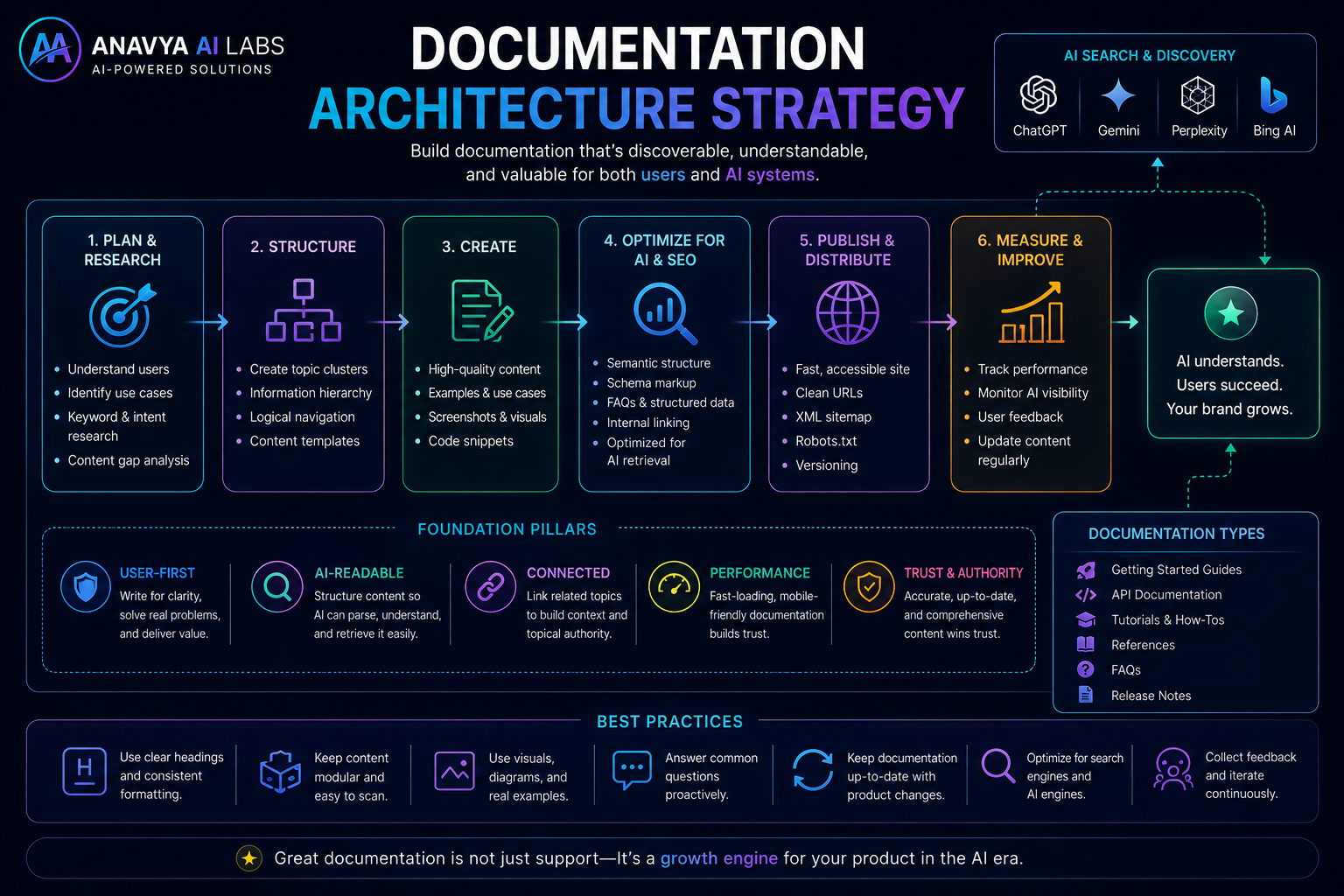
Restructure documentation for AI discovery, not just customer support
Current State Analysis
Most SaaS docs are organized like this:
Product Name Documentation
├── Getting Started
├── Features
│   ├── Feature A
│   ├── Feature B
│   └── Feature C
├── API Reference
├── Integrations
└── FAQs
Problem: This serves existing customers well, but fails at AI discoverability.
Target State: Problem-Centric Organization
Reorganize to this structure:
Product Documentation
├── Getting Started
│   ├── 5-min quickstart
│   ├── Feature overview
│   └── Use case scenarios

├── Core Workflows (Problem-Centric)
│   ├── How to Automate Tasks
│   │   ├── Workflow basics
│   │   ├── Setting up automations
│   │   ├── Advanced workflows
│   │   └── Real-world examples
│   │
│   ├── How to Collaborate Better
│   │   ├── Team setup
│   │   ├── Permissions & roles
│   │   ├── Communication features
│   │   └── Best practices
│   │
│   └── How to Integrate Systems
│       ├── API basics
│       ├── Webhook setup
│       ├── Pre-built integrations
│       └── Custom integration guide

├── Feature Reference (Alphabetical for humans, linked from problems)
├── API & Developer Docs
├── Troubleshooting & FAQs
└── Best Practices & Guides
Why This Works for AI
- Intent Matching: User asks "How do I automate...?" → AI finds exact section
- Comprehensive Answers: Each problem gets a complete, cite-able article
- Internal Linking: Related problems link to each other, creating a knowledge graph
- Solution-Oriented: Positions your tool as THE solution for each problem
Implementation Checklist
- [ ] List all documentation pages you currently have
- [ ] Group by problem they solve (not feature)
- [ ] Identify gaps (problems you don't cover)
- [ ] Create information architecture (wireframe)
- [ ] Plan content creation/consolidation
- [ ] Implement new structure in documentation platform
- [ ] Set up redirects for old URLs
- [ ] Update internal links
Step 2: Optimize Content for AI Comprehension
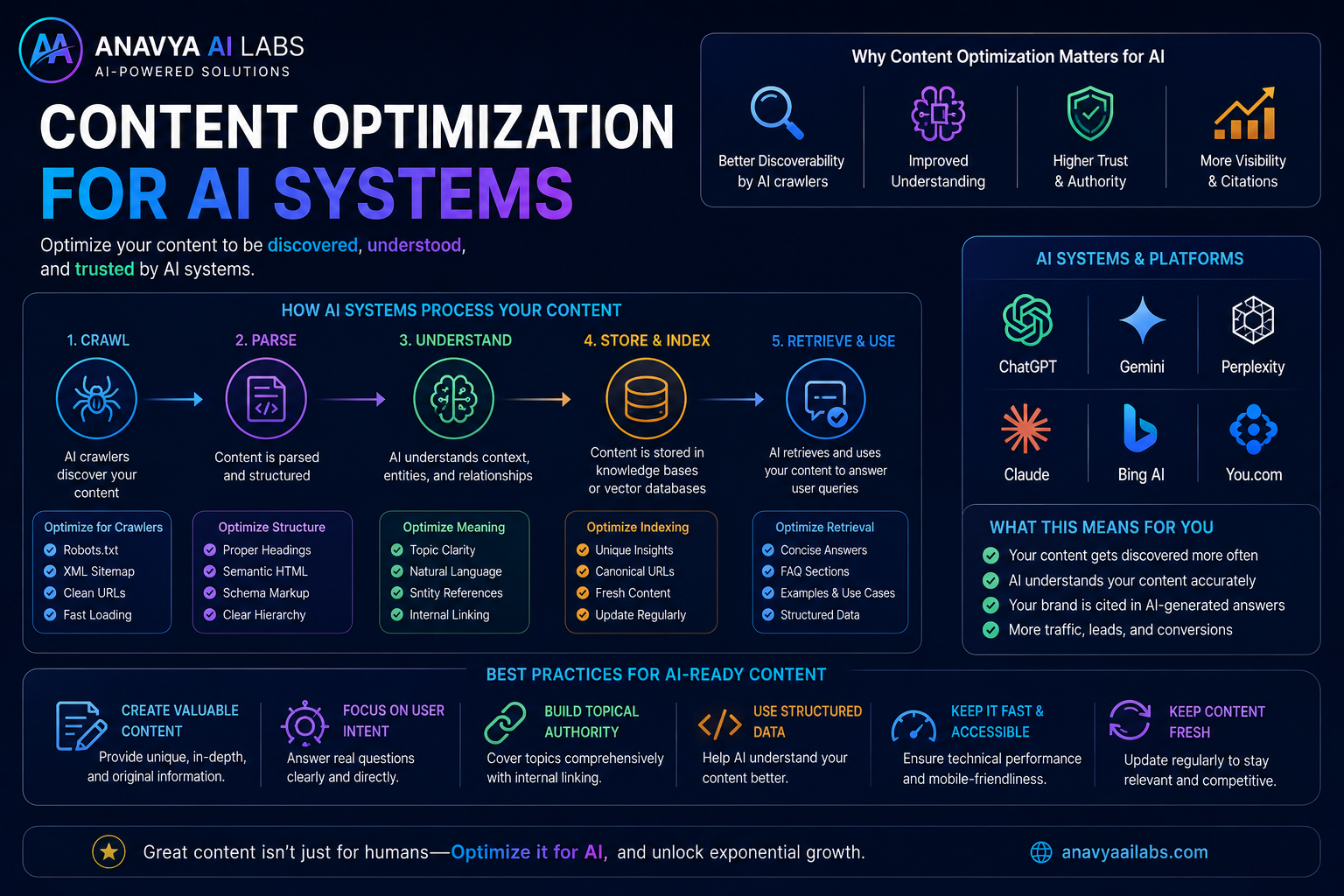
Structure content so AI systems can understand, extract, and cite it
Content Structure Template
Every documentation article should follow this pattern:
1. Opening (50-100 words)
Clearly state what problem this solves:
This guide shows you how to set up automated workflows
in [Product Name]. By the end, you'll be able to:
- Create your first workflow in 5 minutes
- Connect multiple apps automatically
- Save 10+ hours per week on repetitive tasks
2. Table of Contents (Machine-Readable)
Make it scannable:
## In This Guide
1. Prerequisites (2 min)
2. Creating Your First Workflow (5 min)
3. Adding Conditions & Logic (10 min)
4. Testing & Troubleshooting (5 min)
5. Advanced Workflows (optional, 15 min)
6. Common Mistakes & How to Avoid Them
7. Real-World Examples
8. FAQ & Troubleshooting
3. Each Section Should Have:
- Clear H2 Heading - Describes the outcome or problem
- Why This Matters - 1-2 sentences on importance
- Step-by-Step Instructions - Numbered, specific
- Visual Aid - Screenshot, video, diagram
- Example - Real-world use case
- Code Block (if applicable) - Formatted properly
- Common Mistakes - What NOT to do
- Next Steps - Where to go from here
4. Real Example:
## Setting Up Your First Automated Workflow

### Why This Matters

Workflows save teams an average of 12 hours per week
on repetitive tasks. Your first workflow will pay for
the tool in weeks.

### Prerequisites

- Active account in [Product Name]
- At least two apps you want to connect
- 10 minutes of setup time

### Step 1: Access the Workflow Builder

1. Log in to your [Product Name] dashboard
2. Navigate to "Workflows" in the left sidebar
3. Click "Create New Workflow"
4. Choose "Blank Workflow" or a template

**Screenshot:** [workflow-builder-location.png]

### Step 2: Select Your Trigger App

A trigger is the event that starts your workflow.

1. Click "Add Trigger"
2. Search for your app (e.g., "Gmail", "Slack")
3. Select the specific trigger event:
   - New email with subject containing X
   - New message in channel Y
   - Form submission received
4. Click "Connect Account" to authorize

**Example:** If you use Gmail, select "New Email Matching Search"

**Screenshot:** [trigger-selection.png]

### Step 3: Choose Your Action App

Actions are what happens when the trigger fires.

1. Click "Add Action"
2. Select your action app (e.g., "Slack", "Sheets")
3. Select the specific action:
   - Send message to channel
   - Create row in spreadsheet
   - Create task in project
4. Map fields from trigger to action

**Example Workflow:**
- **Trigger:** New email from boss → important
- **Action:** Send Slack notification to #urgent-channel

**Screenshot:** [action-selection.png]

### Step 4: Test Your Workflow

1. Click "Test Workflow"
2. Trigger a test event manually
3. Verify the action completed
4. Check both apps for results

### Common Mistakes to Avoid

❌ **Mistake 1:** Forgetting to authorize both apps
✓ **Fix:** Re-check connection status in each app step

❌ **Mistake 2:** Wrong field mapping
✓ **Fix:** Verify all fields match between apps

❌ **Mistake 3:** Over-complex first workflow
✓ **Fix:** Start simple, add conditions later

### Next Steps

- Learn about [Conditions & Logic →]
- Explore [Advanced Workflows →]
- Browse [Pre-Built Workflow Templates →]

### FAQ

**Q: How many workflows can I create?**
A: Unlimited on [Plan Name]

**Q: Can I trigger workflows manually?**
A: Yes, through the dashboard or mobile app

**Q: Do workflows run in real-time?**
A: Yes, most triggers execute within 30 seconds
Why This Structure Works for AI
✓ Clear hierarchy - AI understands main topics ✓ Specific instructions - AI can cite exact steps ✓ Multiple formats - Text + images + examples ✓ Problem-solution mapping - AI matches intent ✓ Completeness - Comprehensive enough to cite ✓ Real examples - AI prefers concrete over abstract
Step 3: Implement Schema Markup & Metadata
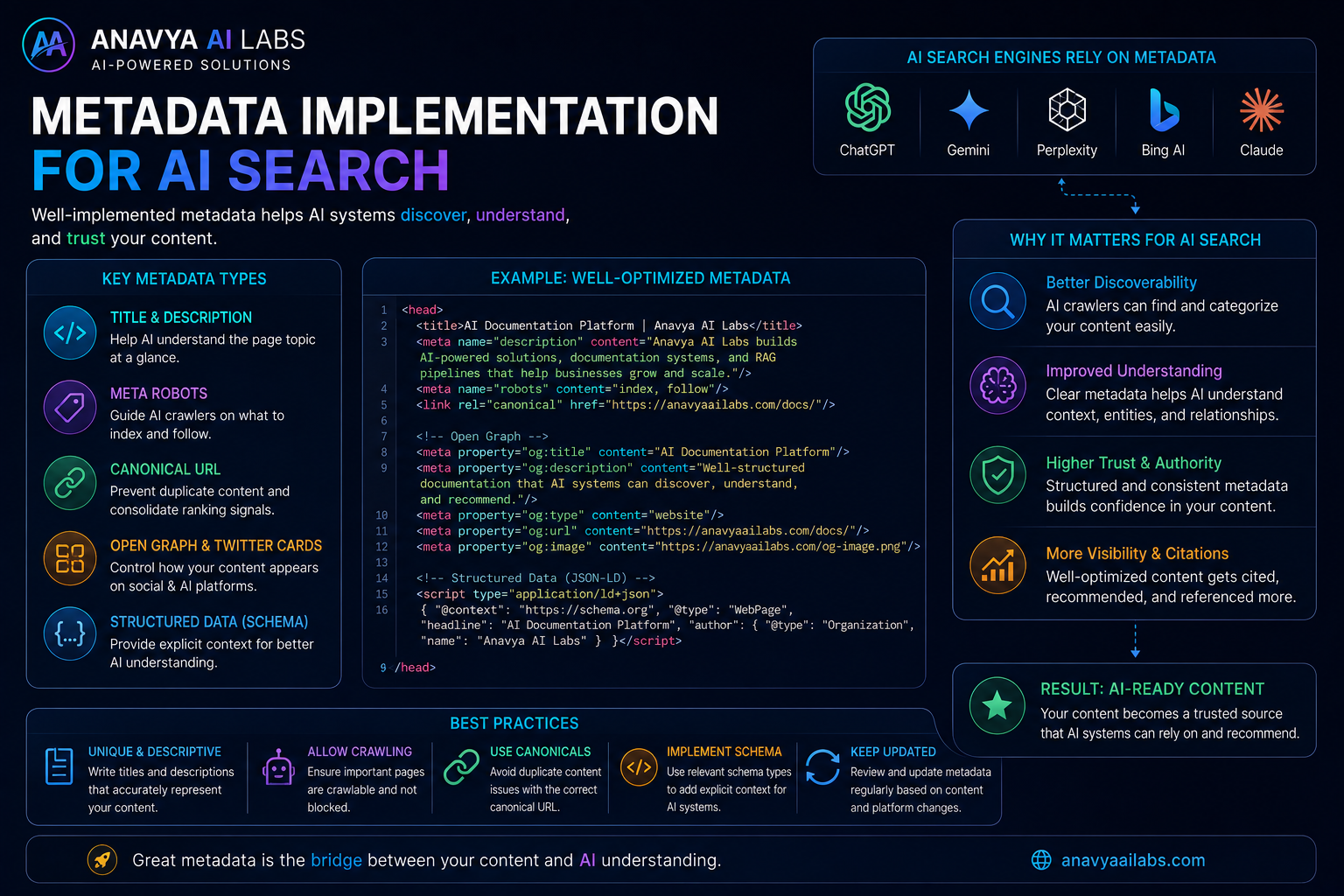
Add machine-readable metadata so AI systems understand your documentation
Required Schema Markups
Add this JSON-LD to every documentation page:
<script type="application/ld+json">
{
  "@context": "https://schema.org",
  "@type": "TechArticle",
  "headline": "How to Set Up Your First Automated Workflow",
  "description": "Step-by-step guide to creating automated workflows in [Product Name]",
  "image": "https://docs.yoursite.com/images/workflow-setup.png",
  "datePublished": "2026-08-25",
  "dateModified": "2026-08-25",
  "author": {
    "@type": "Organization",
    "name": "[Your Company]",
    "url": "https://yoursite.com"
  },
  "publisher": {
    "@type": "Organization",
    "name": "[Your Company]",
    "logo": {
      "@type": "ImageObject",
      "url": "https://yoursite.com/logo.png"
    }
  },
  "inLanguage": "en",
  "isPartOf": {
    "@type": "CreativeWork",
    "name": "[Product Name] Documentation"
  },
  "proficiencyLevel": "Intermediate",
  "learningResourceType": "Guide",
  "educationalLevel": "Professional",
  "keywords": "automation, workflow, integration, [Product Name]",
  "mainEntityOfPage": {
    "@type": "WebPage",
    "@id": "https://docs.yoursite.com/workflows/setup-automation"
  }
}
</script>
Meta Tags for Each Page
<meta name="robots" content="index, follow">
<meta name="description" content="Step-by-step guide to creating automated workflows">
<meta name="keywords" content="automation, workflow, integration">
<meta property="og:title" content="How to Set Up Your First Automated Workflow">
<meta property="og:description" content="Complete guide to workflow automation">
<meta property="og:image" content="https://docs.yoursite.com/images/workflow-setup.png">
<meta property="article:published_time" content="2026-08-25T10:00:00Z">
<meta property="article:modified_time" content="2026-08-25T10:00:00Z">
<meta property="article:author" content="[Your Company]">
Documentation-Specific Meta Headers
Add these to your documentation's front matter:
---
title: "How to Set Up Your First Automated Workflow"
description: "Step-by-step guide to creating automated workflows in [Product Name]"
category: "Workflows"
difficulty: "Beginner"
time-to-complete: "10 minutes"
version: "2.0"
last-updated: "2026-08-25"
product-version: "4.5+"
related-topics:
  - Conditions & Logic
  - Workflow Templates
  - Troubleshooting
tags:
  - automation
  - workflows
  - integration
  - beginners
---
Sitemap Optimization
Create a documentation-specific sitemap:
<?xml version="1.0" encoding="UTF-8"?>
<urlset xmlns="http://www.sitemaps.org/schemas/sitemap/0.9">
  <url>
    <loc>https://docs.yoursite.com/workflows/setup-automation</loc>
    <lastmod>2026-08-25</lastmod>
    <changefreq>weekly</changefreq>
    <priority>0.9</priority>
  </url>
  <!-- Repeat for all docs -->
</urlset>
Step 4: Optimize for AI Crawler Access
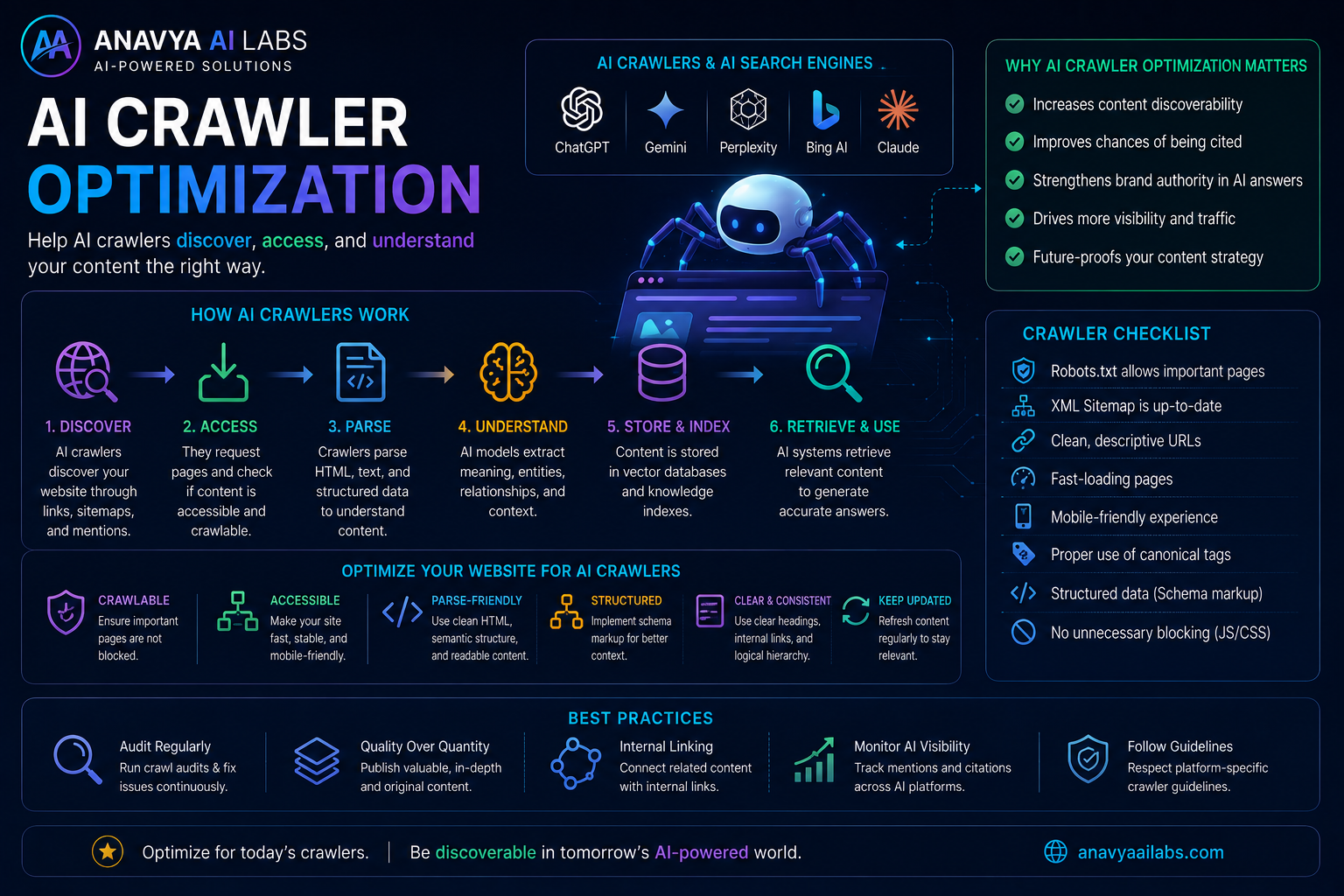
Ensure AI systems can crawl, understand, and cite your documentation
robots.txt Configuration
Update your documentation's robots.txt:
# Allow all AI search crawlers
User-agent: ChatGPT-User
Allow: /

User-agent: CCBot
Allow: /

User-agent: anthropic-ai
Allow: /

User-agent: PerplexityBot
Allow: /

User-agent: Googlebot
Allow: /

User-agent: Bingbot
Allow: /

# Disallow admin/private areas
Disallow: /admin/
Disallow: /private/
Disallow: /internal/
Disallow: /*.pdf$
Disallow: /search

# Allow documentation
Allow: /docs/
Allow: /help/
Allow: /guides/

# Crawl delay (be friendly)
Crawl-delay: 1

# Sitemap
Sitemap: https://docs.yoursite.com/sitemap.xml
Technical Documentation Requirements
1. Server-Side Rendering
Ensure documentation is rendered on the server, not just in JavaScript. AI crawlers need to see HTML, not empty divs waiting for JavaScript.
Bad:
<div id="app"></div>
<script src="app.js"></script>
<!-- AI sees nothing -->
Good:
<div id="content">
  <h1>How to Set Up Workflows</h1>
  <p>Step 1: Access the workflow builder...</p>
  <!-- AI sees full content -->
</div>
2. API Documentation Accessibility
Make API docs crawlable and comprehensive:
/docs/api/v1/workflows
/docs/api/v1/authentication
/docs/api/v1/integrations
Each endpoint should have its own documented page.
3. Version Management
When you update docs, don't delete old versions. Archive them:
/docs/v4.5/workflows/setup
/docs/v4.4/workflows/setup (deprecated)
/docs/v4.3/workflows/setup (deprecated)
Add version notice:
⚠️ This documentation is for Version 4.4
Current version: 4.5 [See latest →]
Step 5: Distribute & Promote Documentation
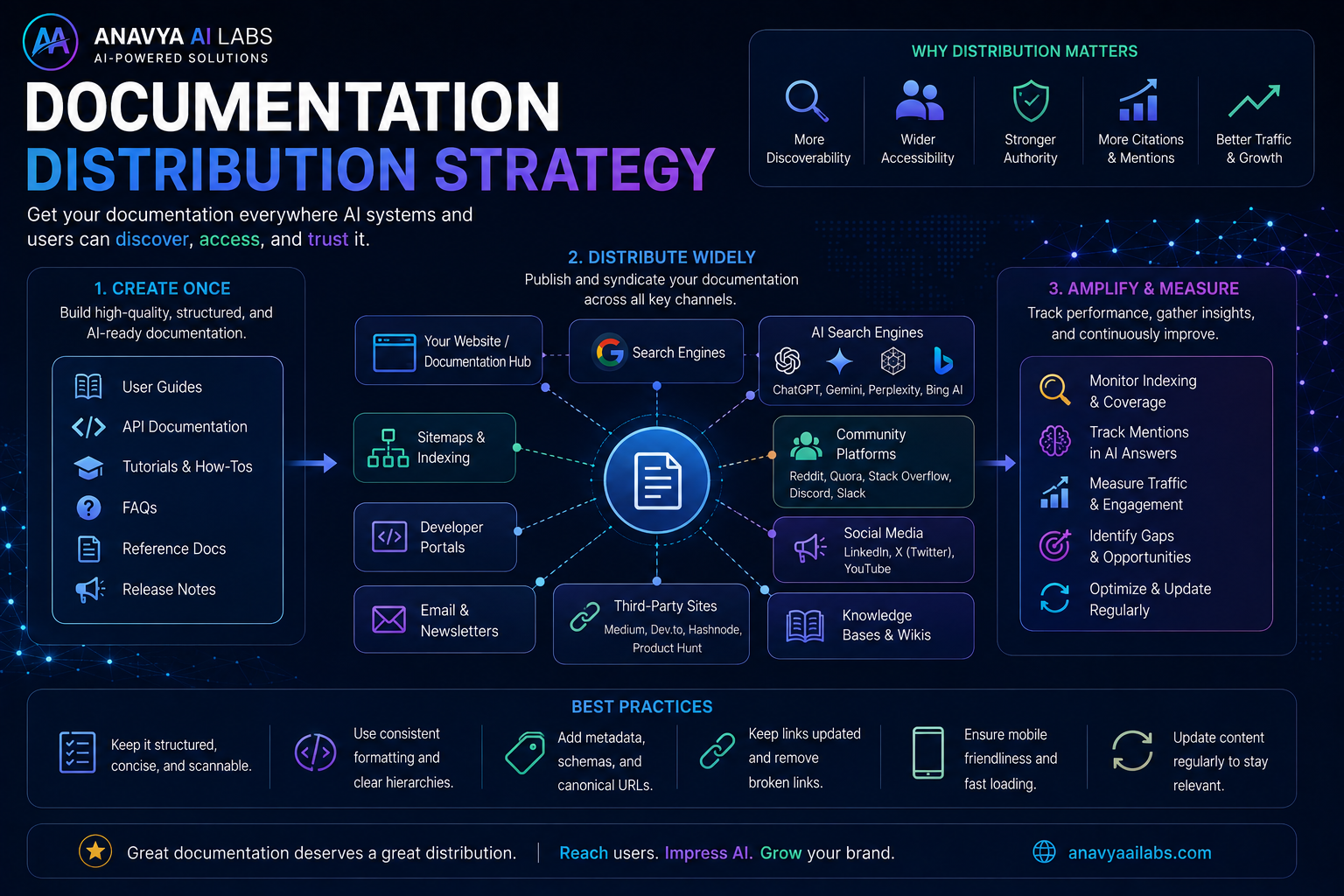
Documentation doesn't grow traffic if no one knows about it
Multi-Channel Distribution Strategy
1. Embed in Product
Link to specific doc articles contextually in your app:
Button text: "How to set up workflows? [Learn →]"
Link to: https://docs.yoursite.com/workflows/setup
2. Email Newsletter
Include documentation highlights:
Subject: "Quick Tip: 5 automation workflows that save hours"

This week's documentation highlight:

How to Set Up Your First Automated Workflow
Learn how to automate repetitive tasks in 10 minutes

[Read Full Guide →]
3. Blog Posts
Write blog posts linking to documentation:
Blog post: "5 Workflows That Save Our Team 10 Hours/Week"
→ Links to: How to Set Up Workflows doc
→ Links to: 5 Real-World Workflow Examples
4. Social Media
Share doc snippets and tips:
LinkedIn Post:

"75% of teams waste time on repetitive tasks.

In [Product Name], you can automate these in minutes.
Here's how:

[Screenshot of workflow setup]

Full guide in our docs:
[Link to documentation]"
5. Webinars & Video Content
Create video versions of key documentation:
YouTube Series: "[Product Name] Beginner Tutorials"
- Episode 1: How to Set Up Your First Workflow
  [Links to docs]
- Episode 2: Advanced Workflow Conditions
  [Links to docs]
- Episode 3: Integrating External Apps
  [Links to docs]
6. Third-Party Platforms
Syndicate documentation summaries:
- Dev.to - Developer tutorials
- Medium - Process guides and workflows
- LinkedIn - Professional use cases
- Product Hunt - Product launches with doc links
- Indie Hackers - Implementation guides
Documentation Citation Strategy
Make it easy for people to cite your docs:
**Citation Format:**

[Your Company] Documentation. (2026, August).
How to Set Up Your First Automated Workflow.
Retrieved from https://docs.yoursite.com/workflows/setup
Part 3: Measuring Success - The AI Documentation Growth Metrics
Key Metrics to Track
| Metric | How to Measure | Goal | |--------|----------------|------| | AI Traffic | Google Analytics - filter by AI crawler referrers | 30%+ of doc traffic from AI in 6 months | | Citation Rate | Manual testing + monitoring tools | 5+ articles cited by AI per month | | Avg Session Duration | GA - documentation pages | 2+ minutes | | Scroll Depth | GA - % of users scrolling to 50% | 70%+ | | CTA Clicks | GA goals - "Try product", "Sign up", etc. | 10%+ CTR from docs | | Search Position | Google Search Console | Top 3 for product-specific queries | | Backlink Growth | Ahrefs, SEMrush | 50+ backlinks per quarter |
Testing for AI Citations
Manual Testing Protocol:
-
ChatGPT Test
Query: "How do I set up automated workflows in [Product Name]?" Look for: Citation of your docs in the response -
Claude Test
Query: "I need to automate my workflow. What are my options with [Product Name]?" Look for: Direct citations to your documentation -
Perplexity Test
Query: "[Product Name] automation guide" Look for: Your documentation in the results -
Google AI Overviews Test
Query: "How to automate workflows"
Look for: Your documentation appearing in AI-generated answer
Recommended Monitoring Tools
- Google Search Console - Track AI Overview appearances
- Google Analytics - Filter traffic by "AI crawler" user agents
- Semrush - Keyword rankings and featured snippet data
- Ahrefs - Backlink profile and citation tracking
- Screaming Frog - Technical SEO audits of documentation
- Hotjar - Session recording and heatmaps on doc pages
Part 4: Real-World Case Study
Before & After: SaaS Company Results
Company: Mid-market project management tool Starting Point: Good documentation, zero AI visibility Timeline: 6-month implementation
Before (Month 0)
- ❌ Documentation organized by features, not problems
- ❌ No schema markup on any pages
- ❌ Minimal internal linking
- ❌ No AI crawler optimization
- ❌ AI search traffic: 0
Implementation (Months 1-3)
✓ Reorganized docs from feature-centric to problem-centric ✓ Added schema markup to all 150+ pages ✓ Created internal linking strategy ✓ Optimized robots.txt for AI crawlers ✓ Added metadata to all pages ✓ Created supplementary blog content
Results (Months 4-6)
📊 AI Search Traffic: 0 → 450 monthly visits 📊 Documentation Citations: 0 → 12 per month 📊 Average Session Duration: 1:20 → 2:45 📊 Product Trial Signups from Docs: 0 → 34 per month 📊 Total Revenue Impact: $0 → $68,000 (estimated annual value from AI-referred trial users)
Key Success Factors
- Comprehensive reorganization - Not just tweaking, full restructure
- Consistent execution - Applied same standards to all pages
- Measurement from day 1 - Tracked what works, doubled down
- Iterative improvements - Updated docs monthly based on performance data
Part 5: Implementation Roadmap
This Week (Priority: HIGH)
- [ ] Audit all current documentation pages
- [ ] Identify top 10 problem areas customers face
- [ ] Create new information architecture document
- [ ] Add basic schema markup to homepage
- [ ] Update robots.txt for AI crawlers
This Month (Priority: HIGH)
- [ ] Implement new documentation structure
- [ ] Add schema markup to all pages
- [ ] Optimize 10 key articles for AI comprehension
- [ ] Set up AI traffic monitoring in GA
- [ ] Create internal linking strategy
This Quarter (Priority: HIGH)
- [ ] Complete schema markup for all 100+ pages
- [ ] Write/optimize 20 core problem-solution guides
- [ ] Set up documentation analytics dashboard
- [ ] Create video versions of top 5 guides
- [ ] Establish documentation review cycle
Next Quarter (Priority: MEDIUM)
- [ ] Expand documentation to cover 50+ problems
- [ ] Build documentation newsletter
- [ ] Create interactive tutorials/sandbox
- [ ] Establish content partnership opportunities
- [ ] Conduct quarterly AI discoverability audit
Conclusion
Your SaaS documentation is currently underutilized. For most companies, it's a customer support tool. But for companies that treat it as a strategic asset, it's a growth engine.
The opportunity is enormous because most competitors haven't done this yet. Documentation optimization has a high barrier to execution but relatively low competition. That means first-mover advantage.
Your Next Step
Pick one section of your documentation this week—your most important problem-solution area. Optimize it using the framework above:
- ✓ Reorganize for problem-centricity
- ✓ Structure for AI comprehension
- ✓ Add schema markup
- ✓ Verify crawler access
- ✓ Measure results
Then, measure AI traffic to that section.
If it works (and it will), expand to your entire documentation.
The companies winning in 2026 are those optimizing every asset for AI discovery. Don't let your documentation be a missed opportunity.
Last Updated: August 25, 2026
Read Time: 11 minutes
More Resources
View all documentation guides →
#SaaS Documentation #AI Search Optimization #GEO Strategy #ChatGPT Integration #Claude Optimization #Perplexity Search #Content Strategy #AI Visibility #Documentation Best Practices #AI Growth Engine #Search Visibility #Content Architecture #AI Discovery #SaaS Growth #Technical Documentation