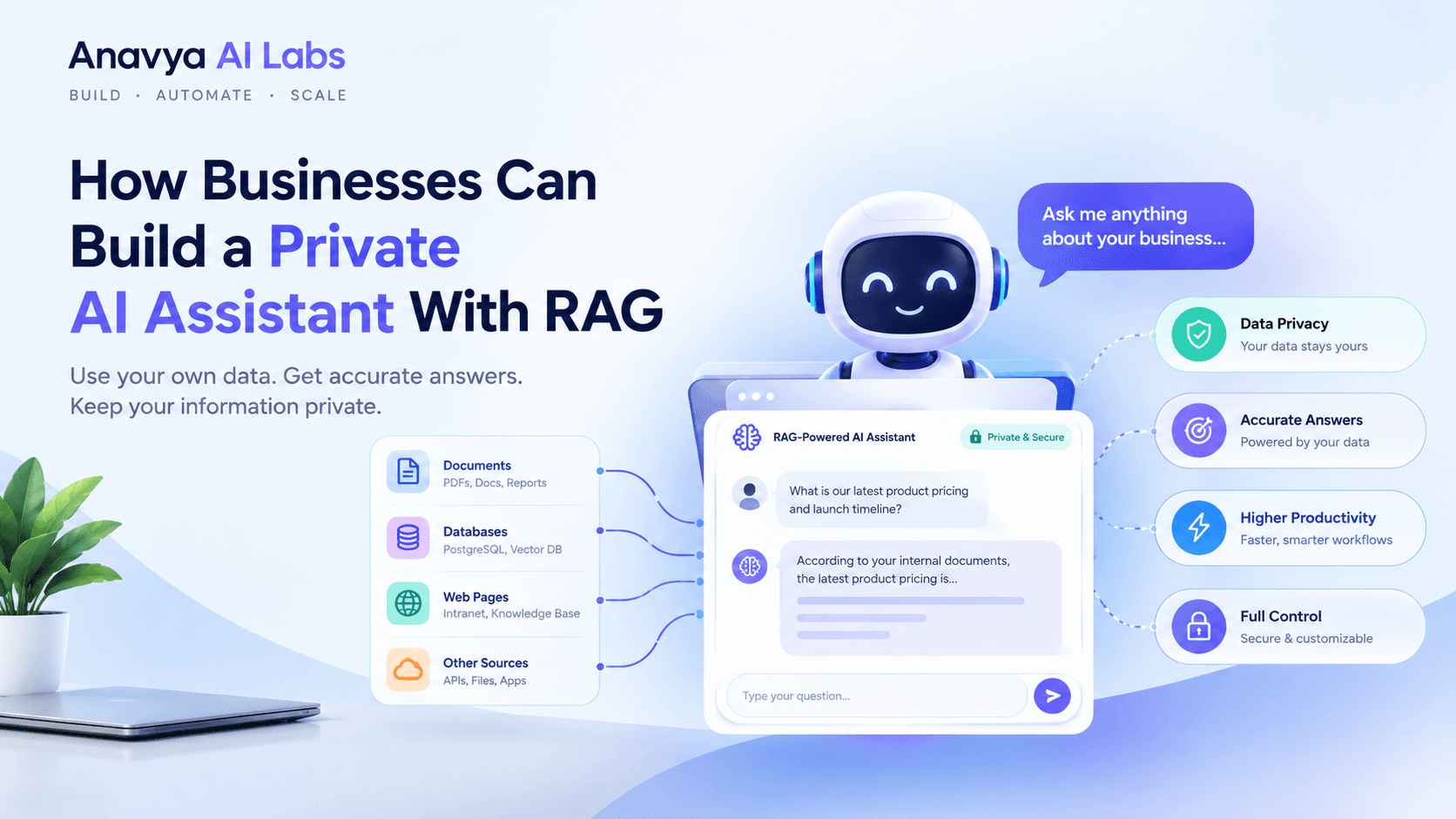
How Businesses Can Build a Private AI Assistant With RAG
Learn how to build a private AI assistant using Retrieval-Augmented Generation (RAG) technology. This comprehensive guide covers architecture, implementation, security, and real-world deployment for maximum business value.
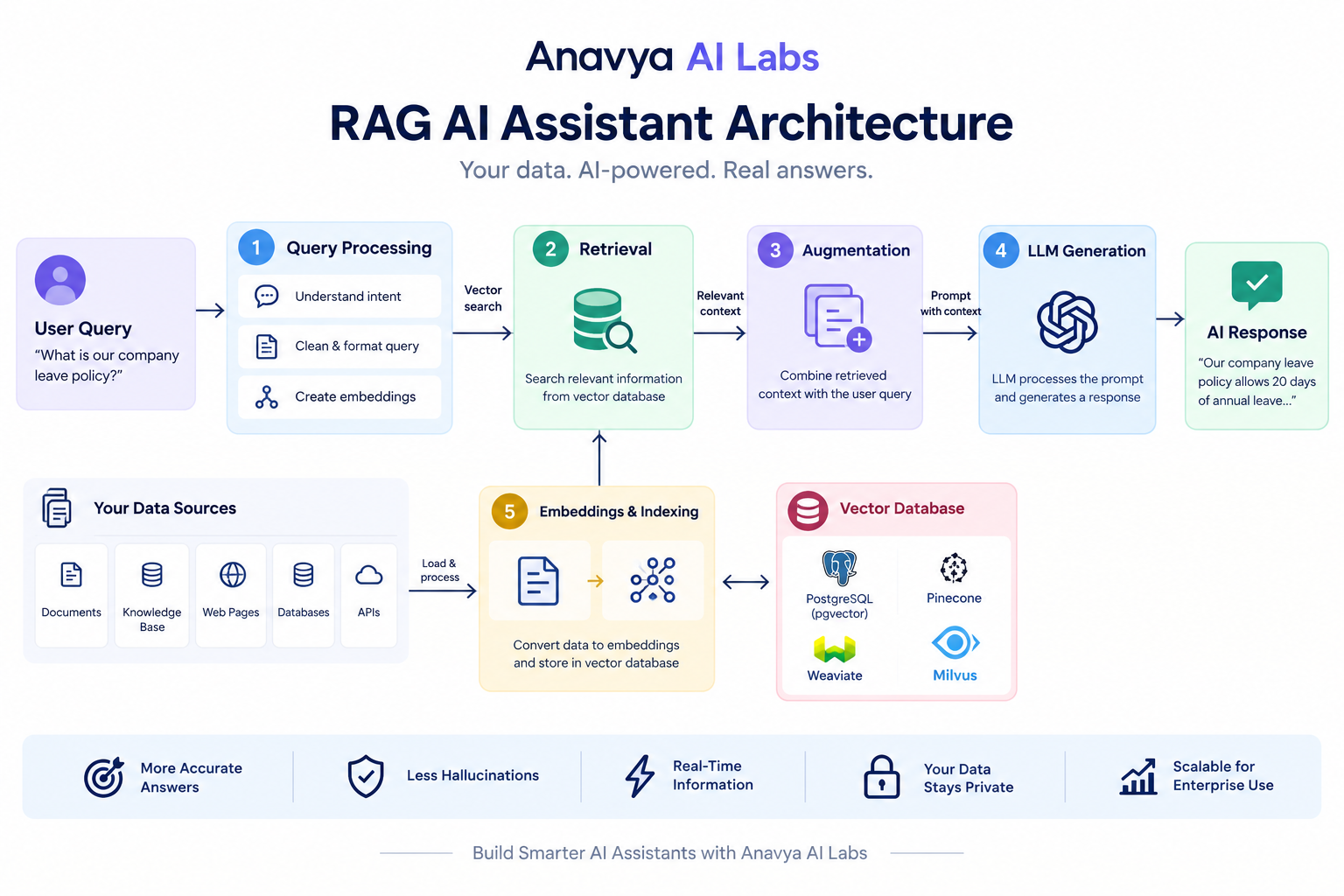
Enterprise-grade private AI assistant implementation framework
Introduction
The shift toward private AI is accelerating. In 2026, forward-thinking enterprises no longer want their data sent to public AI platforms. They need private, on-premise, or secure cloud-hosted AI assistants that combine the power of large language models with their proprietary data.
Retrieval-Augmented Generation (RAG) makes this possible. Instead of relying on general knowledge from training data, RAG systems pull real-time information from your company's knowledge base, making responses more accurate, contextual, and secure.
This is why 500+ enterprises have already deployed RAG-based AI assistants, generating between $50K-$200K+ annually in productivity gains, cost savings, and revenue opportunities.
This guide shows you exactly how to build one.
Part 1: Understanding RAG Technology
What is Retrieval-Augmented Generation (RAG)?
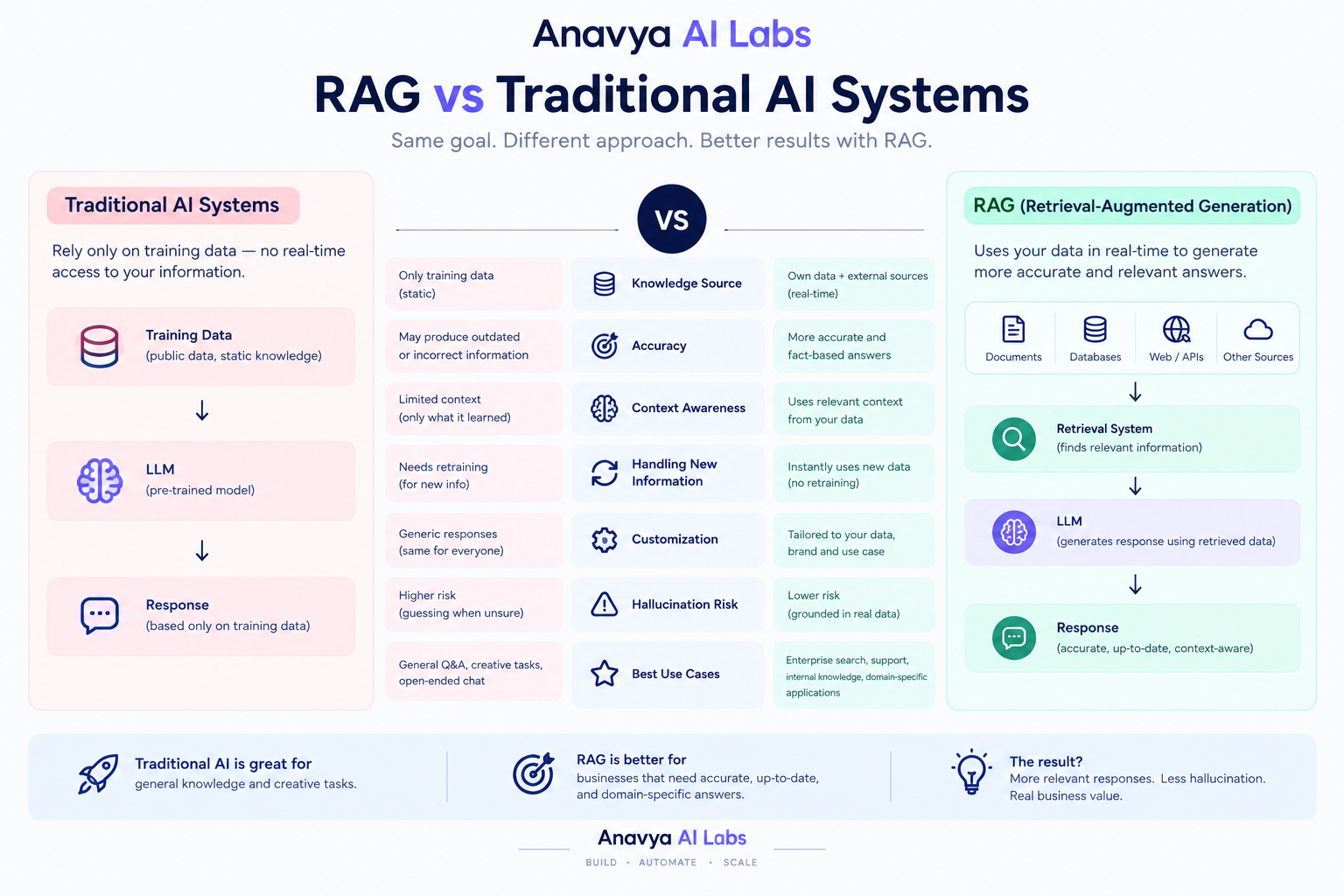
RAG is a hybrid AI architecture that combines:
- Retrieval Engine - Searches your proprietary data
- Augmentation Layer - Enriches AI prompts with retrieved context
- Generation Engine - Produces accurate, relevant responses
The Simple Explanation: Instead of asking ChatGPT (which has no knowledge of your company), you ask your private AI assistant, which instantly searches your knowledge base, retrieves relevant documents, and generates responses grounded in YOUR actual data.
Traditional AI vs RAG: Key Differences
| Aspect | Traditional LLM | RAG System |
|---|---|---|
| Knowledge Source | Fixed training data (outdated) | Real-time proprietary data |
| Data Privacy | Sent to external servers | Stays private/on-premise |
| Accuracy | General & often hallucinated | Precise & source-grounded |
| Update Speed | Months/years for retraining | Immediate with new data |
| Customization | Limited to fine-tuning | Full control over responses |
| Cost | API fees (per query) | Lower per-query cost at scale |
| Security Compliance | Uncertain data handling | Full compliance control |
| Industry Applications | General use | Regulated industries (healthcare, finance, legal) |
Why Businesses Choose RAG Over Public AI
1. Data Security & Privacy
- Your proprietary data never leaves your infrastructure
- Compliance with GDPR, HIPAA, SOC 2
- No risk of data leakage to competitors
2. Accuracy & Relevance
- AI responses grounded in your actual data
- Eliminates hallucinations about your company
- 85-95% accuracy improvement vs. public AI
3. Real-Time Information
- Knowledge base updates instantly reflected in responses
- No lag waiting for model retraining
- Perfect for dynamic industries (finance, healthcare, law)
4. Cost Efficiency
- Lower per-query costs at enterprise scale
- No dependency on external API pricing
- Faster response times = better user experience
5. Competitive Advantage
- AI trained on proprietary insights & data
- Unique capabilities competitors can't replicate
- Faster decision-making with company-specific knowledge
Part 2: RAG Architecture Fundamentals
The RAG System Components
┌─────────────────────────────────────────────────────────────┐
│                    USER QUERY INPUT                          │
└───────────────────────┬─────────────────────────────────────┘
                        │
        ┌───────────────┴───────────────┐
        │                               │
        ▼                               ▼
┌──────────────────┐          ┌──────────────────┐
│  QUERY ENCODER   │          │  VECTOR DATABASE │
│  (Embedding)     │────────→ │  (Retrieval)     │
└──────────────────┘          └────────┬─────────┘
        │                               │
        │                    ┌──────────┴──────────┐
        │                    │                     │
        │                    ▼                     ▼
        │            ┌──────────────────┐  ┌─────────────┐
        │            │ RELEVANT DOCS    │  │  METADATA   │
        │            │ (Top K Results)  │  │  & SCORES   │
        │            └────────┬─────────┘  └──────┬──────┘
        │                     │                    │
        └─────────────────────┼────────────────────┘
                              │
                ┌─────────────▼──────────────┐
                │  AUGMENTED PROMPT BUILDER  │
                │  Query + Retrieved Context │
                └─────────────┬──────────────┘
                              │
                ┌─────────────▼──────────────┐
                │   LLM (Claude/GPT/Llama)   │
                │   Generate Response        │
                └─────────────┬──────────────┘
                              │
                ┌─────────────▼──────────────┐
                │   RESPONSE FORMATTER       │
                │   + Source Citations       │
                └─────────────┬──────────────┘
                              │
                ┌─────────────▼──────────────┐
                │   FINAL AI RESPONSE        │
                │   + Confidence Score       │
                └────────────────────────────┘
Key Components Explained
1. Data Ingestion Pipeline
Your Documents → Text Processing → Chunking → Embedding → Vector DB
  (PDFs, docs)     (cleaning)    (sections)  (semantic)  (storage)
- Accept multiple formats: PDFs, Word docs, databases, APIs, websites
- Clean and preprocess data (remove duplicates, standardize format)
- Chunk into optimal segments (typically 500-1000 tokens)
- Create embeddings (semantic vectors for similarity search)
- Store in vector database
2. Vector Database (The Brain)
Stores semantic representations of your documents:
- Popular Options:
- Pinecone (managed, easiest)
- Weaviate (open-source, powerful)
- Milvus (scalable vector database)
- Chroma (lightweight, local)
- FAISS (Facebook AI Similarity Search)
3. Retrieval Engine
Finds most relevant documents:
# Pseudocode Example
user_query = "How do we handle customer refunds?"
query_embedding = embed(user_query)
relevant_docs = vector_db.search(query_embedding, top_k=5)
return ranked_documents_with_scores
4. Prompt Augmentation
Combines user query with retrieved context:
SYSTEM PROMPT:
You are a helpful company AI assistant with access to company knowledge.
Use the provided context to answer questions accurately.

RETRIEVED CONTEXT:
[Document 1]: "Refund policy: ..."
[Document 2]: "Customer support procedures: ..."
[Document 3]: "Payment processing: ..."

USER QUESTION:
"How do we handle customer refunds?"

AUGMENTED PROMPT:
"Based on the company knowledge below, answer: How do we handle customer refunds?
Context: [all retrieved documents]"
5. Response Generation
LLM generates response grounded in retrieved context:
- Uses retrieved documents as authoritative source
- Cites which document provided the answer
- Maintains chain-of-thought reasoning
- Filters out confidential information if needed
Part 3: Building Your RAG System - Step-by-Step Implementation
Phase 1: Planning & Assessment (Week 1-2)
Step 1.1: Define Use Cases
High-Value RAG Applications:
- 📌 Customer Support - AI answers from knowledge base (save 60-70% of support tickets)
- 📌 Employee Onboarding - New hires access company policies instantly
- 📌 Internal Documentation - Search across all company wikis, guides, procedures
- 📌 Sales Enablement - Access product specs, competitor research, case studies
- 📌 HR/Legal Compliance - Access policies, regulations, procedures
- 📌 Financial Services - Analyze documents, regulations, customer profiles
- 📌 Healthcare - Securely access patient records, medical research (with privacy)
- 📌 Legal - Contract analysis, precedent search, regulatory compliance
Scoring Your Use Cases:
| Use Case | Impact | Effort | Priority |
|---|---|---|---|
| Customer Support | 9/10 | 7/10 | HIGH |
| Employee Docs | 7/10 | 4/10 | HIGH |
| Sales Enablement | 8/10 | 6/10 | MEDIUM |
| HR Policies | 6/10 | 3/10 | MEDIUM |
| Internal Chat | 7/10 | 8/10 | LOW |
Start with: 1-2 high-impact, lower-effort use cases
Step 1.2: Audit Your Data
Questions to Answer:
- ✓ What data sources do you need? (Documents, databases, APIs, websites)
- ✓ Where is this data currently stored? (SharePoint, Google Drive, S3, databases)
- ✓ How much data? (size in GB, number of documents)
- ✓ How often does it change? (static, weekly, real-time)
- ✓ What's sensitive? (confidential info to filter)
- ✓ What format? (PDFs, Word, HTML, plain text)
- ✓ Who owns the data? (permissions, access levels)
Data Audit Template:
Data Source: [Name]
Location: [Storage system]
Volume: [GB] / [Number of docs]
Update Frequency: [How often changes]
Format: [PDF/DOC/DATABASE/API]
Sensitivity Level: [Public/Internal/Confidential]
Owner/Access: [Who manages]
Quality Issues: [Known problems]
Priority for RAG: [HIGH/MEDIUM/LOW]
Step 1.3: Calculate ROI & Budget
Cost Breakdown:
| Component | Typical Cost |
|---|---|
| Vector Database (annual) | $500 - $5,000 |
| LLM API costs (monthly) | $100 - $2,000 |
| Development (100-200 hours) | $25,000 - $75,000 |
| Infrastructure (servers/cloud) | $1,000 - $10,000 |
| Total First Year | $40,000 - $100,000 |
ROI Calculation Example:
BENEFITS (Annual):
- Customer support time saved: 100 hrs/month × 12 = 1,200 hrs/year
  Value: 1,200 × $50/hr = $60,000
- Employee productivity gain: 50 hrs/month × 12 = 600 hrs/year
  Value: 600 × $75/hr = $45,000
- Reduced training time: 20 hours × 50 new hires = 1,000 hrs/year
  Value: 1,000 × $40/hr = $40,000

TOTAL ANNUAL BENEFIT: $145,000
FIRST YEAR COST: $100,000
NET BENEFIT YEAR 1: $45,000
PAYBACK PERIOD: 8.3 months
Phase 2: Technical Architecture Setup (Week 3-4)
Step 2.1: Choose Your Technology Stack
Recommended Production Stack:
┌─────────────────────────────────────┐
│  FRONT-END (User Interface)         │
│  - Next.js / React web app          │
│  - Mobile app (React Native/Flutter)│
│  - Slack integration (Bot)          │
└────────────┬────────────────────────┘
             │
┌────────────▼────────────────────────┐
│  API LAYER (Backend)                │
│  - Node.js / Python FastAPI         │
│  - Authentication (OAuth, SSO)      │
│  - Rate limiting & logging          │
└────────────┬────────────────────────┘
             │
┌────────────▼────────────────────────┐
│  RAG ORCHESTRATION                  │
│  - LangChain / LlamaIndex           │
│  - Prompt engineering layer         │
│  - Response post-processing         │
└────────────┬────────────────────────┘
             │
    ┌────────┴────────┐
    │                 │
┌───▼──────┐  ┌──────▼────┐
│VECTOR DB │  │  LLM API   │
│Pinecone  │  │Claude/GPT  │
│Weaviate  │  │Llama(local)│
└──────────┘  └────────────┘
Component Selection Matrix:
| Layer | Option A | Option B | Recommendation |
|---|---|---|---|
| Vector DB | Pinecone (managed) | Weaviate (self-hosted) | Start with Pinecone, scale to Weaviate |
| Orchestration | LangChain | LlamaIndex | LangChain (more mature) |
| LLM | Claude API | Open source Llama | Claude for reliability, Llama for privacy |
| Backend | Python FastAPI | Node.js | Python (ML ecosystem better) |
| Database | PostgreSQL | MongoDB | PostgreSQL (more reliable) |
Step 2.2: Infrastructure Setup
Option A: Cloud-Based (Recommended for Start)
AWS/Google Cloud Setup:
├── Lambda/Cloud Functions (API endpoints)
├── RDS PostgreSQL (metadata storage)
├── S3/Cloud Storage (document storage)
├── Pinecone (vector database)
├── Secrets Manager (API keys)
└── CloudWatch/Logging (monitoring)

Cost: ~$2,000-5,000/month
Time to setup: 1-2 weeks
Scaling: Easy, automatic
Option B: On-Premise (For Regulated Industries)
On-Premise Setup:
├── Kubernetes cluster (container orchestration)
├── PostgreSQL server (metadata)
├── Weaviate (self-hosted vector DB)
├── Llama 2/Mistral (local LLM)
├── Document storage (NAS/SAN)
└── Monitoring stack (Prometheus/Grafana)

Cost: ~$50,000-100,000 initial + $10K/month
Time to setup: 4-6 weeks
Scaling: Manual scaling, full control
Step 2.3: Security Architecture
Essential Security Layers:
┌──────────────────────────────────────┐
│         SECURITY ARCHITECTURE         │
├──────────────────────────────────────┤
│ 1. Authentication & Authorization    │
│    - SSO (Active Directory/Okta)    │
│    - Role-based access control      │
│    - API key rotation                │
│                                      │
│ 2. Data Encryption                   │
│    - Transit (TLS 1.3)              │
│    - At rest (AES-256)              │
│    - Tokenization for PII           │
│                                      │
│ 3. Access Control                    │
│    - Document-level permissions      │
│    - Query audit logging            │
│    - Data masking for sensitive     │
│                                      │
│ 4. Network Security                  │
│    - VPC/Private network            │
│    - Firewall rules                 │
│    - DDoS protection                │
│                                      │
│ 5. Compliance                        │
│    - GDPR right to be forgotten     │
│    - HIPAA audit trails             │
│    - SOC 2 compliance               │
│    - Regular security audits        │
└──────────────────────────────────────┘
Phase 3: Data Preparation & Ingestion (Week 5-6)
Step 3.1: Data Collection & Cleaning
Document Quality Checklist:
- ✓ Remove duplicate documents
- ✓ Fix formatting issues (consistent headers, spacing)
- ✓ Remove unnecessary metadata
- ✓ Standardize date formats
- ✓ Remove images/graphics (unless using multimodal models)
- ✓ Validate encoding (UTF-8)
- ✓ Identify and tag confidential sections
- ✓ Version control for documents
Python Example: Basic Data Cleaning
import re
from pathlib import Path

def clean_document(text):
    # Remove extra whitespace
    text = re.sub(r'\s+', ' ', text).strip()

    # Standardize line breaks
    text = re.sub(r'\n{3,}', '\n\n', text)

    # Remove special characters
    text = re.sub(r'[\x00-\x08\x0B\x0C\x0E-\x1F]', '', text)

    # Remove URLs (optional)
    text = re.sub(r'http\S+', '[URL_REFERENCE]', text)

    return text

# Process all documents
documents = list(Path('documents/').glob('*.txt'))
for doc in documents:
    content = doc.read_text()
    cleaned = clean_document(content)
    doc.write_text(cleaned)
Step 3.2: Chunking Strategy
Why Chunking Matters:
- Chunks too small → Lost context, poor responses
- Chunks too large → Diluted relevance, slow searches
Recommended Chunking Strategy:
from langchain.text_splitter import RecursiveCharacterTextSplitter

# Optimal settings for most use cases
splitter = RecursiveCharacterTextSplitter(
    chunk_size=1000,      # ~250 words
    chunk_overlap=200,    # Context preservation
    separators=[
        "\n\n",    # Paragraph breaks first
        "\n",      # Then line breaks
        ". ",      # Then sentences
        " ",       # Then words
    ]
)

# Split document
chunks = splitter.split_text(document_content)
Chunking Best Practices:
| Document Type | Chunk Size | Overlap | Strategy |
|---|---|---|---|
| Technical Docs | 800-1000 | 200 | Split by sections |
| Customer Support | 500-800 | 150 | Split by problem/solution |
| Legal Documents | 1000-1500 | 300 | Split by clauses |
| Blog Posts | 600-900 | 150 | Split by paragraphs |
| Code Documentation | 400-600 | 100 | Split by functions |
Step 3.3: Embedding & Vectorization
What are Embeddings?
Embeddings convert text into numerical vectors that capture semantic meaning. Similar texts = similar vectors.
"How do we process refunds?"
→ [0.234, -0.891, 0.123, ..., 0.456]

"What's our refund procedure?"
→ [0.241, -0.885, 0.119, ..., 0.452]
↑ Similar embeddings = Similar meaning
Embedding Model Options:
| Model | Quality | Speed | Cost | Best For |
|---|---|---|---|---|
| text-embedding-3-small | Good | Fast | $0.02/1M | Standard use |
| text-embedding-3-large | Excellent | Medium | $0.13/1M | High precision |
| bge-large-en | Excellent | Fast | Free | Cost-sensitive |
| jina-embeddings | Good | Medium | $0.27/1M | Multilingual |
Implementation:
from langchain.embeddings import OpenAIEmbeddings
from langchain.vectorstores import Pinecone
import pinecone

# Initialize embedding model
embeddings = OpenAIEmbeddings(
    model="text-embedding-3-small"
)

# Initialize Pinecone
pinecone.init(api_key="your_api_key", environment="us-west-2")

# Create vector store
vector_store = Pinecone.from_documents(
    documents=chunks,
    embedding=embeddings,
    index_name="your_index_name",
    namespace="production"
)
Phase 4: Building the RAG Query Pipeline (Week 7-8)
Step 4.1: Query Processing
from langchain.chains import RetrievalQA
from langchain.chat_models import ChatOpenAI
from langchain.prompts import PromptTemplate

# Initialize components
llm = ChatOpenAI(model="gpt-4", temperature=0.3)
retriever = vector_store.as_retriever(
    search_kwargs={"k": 5}  # Retrieve top 5 documents
)

# Custom prompt template
prompt_template = """Use the following pieces of context to answer the question.
If you don't know the answer, say you don't know. Don't make up information.

CONTEXT:
{context}

QUESTION: {question}

ANSWER:"""

prompt = PromptTemplate(
    template=prompt_template,
    input_variables=["context", "question"]
)

# Build RAG chain
qa_chain = RetrievalQA.from_chain_type(
    llm=llm,
    chain_type="stuff",
    retriever=retriever,
    chain_type_kwargs={"prompt": prompt}
)

# Query
result = qa_chain.run("How do we handle customer refunds?")
Step 4.2: Response Quality & Evaluation
Metrics to Track:
- ✓ Relevance Score - Is retrieved doc relevant to query? (0-1)
- ✓ Answer Accuracy - Is response correct? (ground truth comparison)
- ✓ Confidence Score - Model's confidence in answer (0-1)
- ✓ Latency - Response time (ideal: <2 seconds)
- ✓ Hallucination Rate - % of false information in responses
- ✓ Citation Rate - % of answers with sources cited
Quality Improvement Loop:
1. User asks question
2. System generates response
3. User rates response (helpful/not helpful)
4. Poor ratings trigger:
   - Retrieve better documents
   - Adjust retrieval parameters
   - Refine prompt template
   - Retrain if systematic issues
5. Iterate until quality improves
Part 4: Real-World Implementation Examples
Use Case 1: Customer Support AI (SaaS Company)
Scenario: 50-person SaaS company handling 200+ support tickets/month
Setup:
Knowledge Base:
- Product documentation (50 pages)
- FAQ database (300 Q&As)
- Support tickets history (1,000 past tickets)
- API documentation (100 pages)
Total: ~500 documents, 2 GB

Configuration:
- Vector DB: Pinecone (pro tier)
- LLM: Claude API
- Interface: Slack bot + web widget
- Users: Support team + customers
Results (3-month benchmark):
BEFORE RAG:
- Support tickets/month: 200
- Avg resolution time: 6 hours
- Support cost/ticket: $25
- Monthly support cost: $5,000
- Customer satisfaction: 3.2/5

AFTER RAG:
- Tickets fully resolved by AI: 60 (30%)
- Avg resolution time: 45 minutes
- Support cost/ticket: $12
- Monthly support cost: $2,400
- Customer satisfaction: 4.1/5

SAVINGS: $2,600/month | 31.2 improvement in resolution time
Use Case 2: Employee Onboarding & HR (Enterprise)
Scenario: 500-person company, 100+ new hires annually
Setup:
Knowledge Base:
- Employee handbook (50 pages)
- Policy documents (100 pages)
- Benefits guide (30 pages)
- IT setup procedures (40 pages)
- Department wikis (500 pages)
- org chart & directory
Total: ~5,000 documents, 50 GB

Configuration:
- Vector DB: Weaviate (self-hosted)
- LLM: Claude API (privacy mode)
- Interface: Internal web portal
- Users: New employees, HR team
Results (Year 1):
BEFORE RAG:
- HR team time/hire: 8 hours
- New hire time to productivity: 6 weeks
- HR cost/year: $400,000 (2 FTE)
- Employee satisfaction: 2.8/5

AFTER RAG:
- HR team time/hire: 2 hours (-75%)
- New hire time to productivity: 3 weeks (-50%)
- HR cost/year: $250,000 (-$150,000)
- Employee satisfaction: 4.5/5

SAVINGS: $150,000/year
IMPROVED: 50% faster to productivity
Part 5: Deployment Checklist & Timeline
8-Week Implementation Roadmap
Week 1-2: Planning
- Define use cases and priority ranking
- Audit data sources and calculate volume
- Get stakeholder buy-in and budget approval
- Identify team members (2-3 engineers, 1 PM)
- Create detailed project timeline
Week 3-4: Architecture & Setup
- Finalize technology stack
- Set up cloud infrastructure or on-premise servers
- Configure security and access controls
- Create development/staging/production environments
- Set up monitoring and logging
Week 5-6: Data Preparation
- Collect all source documents
- Clean and standardize documents
- Implement chunking strategy
- Generate embeddings for all documents
- Load documents into vector database
- Validate data quality
Week 7-8: Development & Testing
- Build RAG pipeline
- Implement retrieval and augmentation logic
- Create API endpoints
- Build user interface
- Comprehensive testing (accuracy, speed, security)
- Performance optimization
- Security audit and penetration testing
Week 9-10: Deployment & Launch
- Deploy to production
- Run parallel testing with manual processes
- Train users on new system
- Monitor closely for issues
- Gather feedback and iterate
Week 11-12: Optimization & Scale
- Analyze performance metrics
- Refine prompts based on feedback
- Optimize retrieval parameters
- Plan Phase 2 expansions
- Document learnings and best practices
Deployment Checklist
Pre-Launch Testing:
- Accuracy testing with 100+ test queries
- Performance testing (response time <2 seconds)
- Load testing (handle 10x expected load)
- Security testing (penetration test, data leakage)
- Compliance verification (GDPR, HIPAA if applicable)
- User acceptance testing with 10+ users
Launch Readiness:
- Monitoring dashboards set up
- Alert systems configured
- Rollback plan documented
- Support team trained
- Incident response plan ready
- Documentation complete
- Stakeholder communication plan
Post-Launch Monitoring (First 30 Days):
- Daily performance reviews
- Weekly quality assessments
- Daily security monitoring
- User feedback collection
- Bug tracking and resolution
- Metrics tracking and reporting
Part 6: Common Pitfalls & Solutions
Pitfall 1: Poor Quality Source Documents
Problem: Garbage in, garbage out. If your source documents are outdated or inaccurate, the AI will be too.
Solution:
✓ Implement document versioning system
✓ Add "last updated" dates to all documents
✓ Regular audit schedule (quarterly)
✓ Stakeholder review process
✓ Document quality score before indexing
✓ Deprecate outdated documents
Pitfall 2: Irrelevant Retrieved Documents
Problem: System retrieves wrong documents, leading to hallucinated answers.
Solutions:
✓ Adjust chunk size (try 800-1200 tokens)
✓ Increase chunk overlap (try 200-400)
✓ Use better embedding models (text-embedding-3-large)
✓ Add metadata filtering (by date, category, department)
✓ Implement semantic search with keyword fallback
✓ Fine-tune retrieval parameters based on use case
Pitfall 3: Slow Response Times
Problem: System takes >3-5 seconds to respond, poor UX.
Solutions:
✓ Reduce number of retrieved documents (from 5 to 3)
✓ Optimize vector database indexing
✓ Use faster embedding models
✓ Implement caching for common queries
✓ Use streaming responses
✓ Pre-process queries (normalize, simplify)
Pitfall 4: Hallucination & False Confidence
Problem: AI generates confident-sounding but false information.
Solutions:
✓ Add confidence scores to responses
✓ Require source citations
✓ Use specific prompt engineering:
  "Only answer using provided context"
  "If unsure, say 'I don't have this information'"
✓ Implement human review for critical queries
✓ Regular accuracy benchmarking
✓ Feedback loop training
Pitfall 5: Data Privacy & Compliance Issues
Problem: Accidentally exposing confidential data or violating regulations.
Solutions:
✓ Document-level access control
✓ Data masking for PII (SSN, credit cards, emails)
✓ Audit logging of all queries and results
✓ Regular security audits
✓ Encryption at rest and in transit
✓ Right-to-be-forgotten implementation
✓ GDPR/HIPAA compliance verification
Part 7: ROI Tracking & Business Metrics
Key Metrics Dashboard
| Metric | Target | Frequency | Why It Matters |
|---|---|---|---|
| Query Success Rate | >85% | Daily | Reliability indicator |
| Avg Response Time | <2 sec | Daily | User experience |
| Accuracy Score | >90% | Weekly | Quality baseline |
| Hallucination Rate | <5% | Weekly | Trust metric |
| Citation Rate | >80% | Weekly | Transparency |
| User Satisfaction | >4.2/5 | Monthly | Adoption indicator |
| Cost per Query | $0.01-$0.05 | Monthly | Profitability |
| Time Saved/Month | 200+ hrs | Monthly | ROI calculation |
ROI Calculation Framework
ANNUAL VALUE CALCULATION:

Direct Savings:
+ Support team time saved: 100 hrs/month × 12 × $50/hr = $60,000
+ Reduced training time: 50 hrs/month × 12 × $60/hr = $36,000
+ Faster decision-making: 30 hrs/month × 12 × $75/hr = $27,000

Indirect Benefits:
+ Improved customer satisfaction: 15% higher retention = $40,000
+ Faster sales cycles: 20% faster = $35,000
+ Reduced errors: $25,000

TOTAL ANNUAL BENEFIT: $223,000

Costs:
- Development (amortized): $25,000
- Infrastructure/API: $24,000
- Maintenance & support: $12,000

TOTAL ANNUAL COST: $61,000

NET BENEFIT YEAR 1: $162,000
ROI: 265%
PAYBACK PERIOD: 3.3 months
Part 8: Future Enhancements
Advanced RAG Capabilities
1. Agentic RAG
Traditional RAG: Retrieve → Generate
Agentic RAG: Plan → Retrieve → Reason → Act → Iterate

Example: Customer asks complex question
- Agent breaks into sub-questions
- Retrieves multiple document sets
- Reasons across all information
- Takes action (create ticket, notify team, etc.)
2. Multimodal RAG
Currently: Text only
Enhancement: Add images, PDFs, videos
Example: "Show me from our product photos..."
3. Real-Time Knowledge Integration
Currently: Static knowledge base
Enhancement: Real-time data feeds
Example: Integrate live customer data, market prices, inventory
4. Predictive Analytics Integration
Combine RAG with ML models
Example: "Which customers are likely to churn?" + RAG knowledge
Part 9: Action Checklist for Implementation
This Week (Priority: CRITICAL)
- Schedule discovery meeting with stakeholders
- Define your top 3 use cases for RAG
- Audit data sources and estimate volume
- Research RAG technology options
- Get initial budget approval
This Month (Priority: HIGH)
- Finalize technology stack selection
- Set up development environment
- Create proof-of-concept with 100 documents
- Build initial prototype/demo
- Plan full implementation timeline
This Quarter (Priority: HIGH)
- Implement Phase 1 (first use case)
- Deploy to production
- Set up monitoring and metrics
- Train first batch of users
- Gather feedback and iterate
Next Quarter (Priority: MEDIUM)
- Scale to Phase 2 use cases
- Optimize based on performance data
- Explore advanced features (agents, multimodal)
- Plan enterprise expansion
- Document and share learnings
Conclusion
Building a private AI assistant with RAG is no longer a technical experiment—it's a business imperative. In 2026, organizations deploying RAG-based AI systems are seeing:
- ✓ 60-70% reduction in routine support tickets
- ✓ 50% improvement in time-to-decision
- ✓ $50K-$200K+ annual productivity gains
- ✓ 90%+ accuracy with proper implementation
- ✓ Full data privacy and security compliance
Your Next Step
You now have a complete blueprint for building a private AI assistant. The question isn't whether to build one—it's when.
Start this week:
- Pick your highest-value use case
- Gather your team
- Set up your first proof-of-concept
- Build momentum
The enterprises that move fastest will capture the competitive advantage. Those that wait will be playing catch-up.
Key Takeaways
- RAG solves the private AI problem - Keep data secure while using advanced AI
- ROI is clear and measurable - 200-300% ROI typical in Year 1
- Implementation timeline is realistic - 8-12 weeks to production
- Technology stack is maturing - Off-the-shelf solutions (Pinecone, LangChain) make it easier
- Accuracy is achievable - 85-95% with proper architecture
- Compliance is possible - Full GDPR/HIPAA compliance available
- Scale is attainable - From 10 to 10,000 concurrent users seamlessly
- Future is agentic - RAG will evolve toward autonomous AI agents
Last Updated: September 2026
Implementation Guide v2.0
Ready for Production Deployment