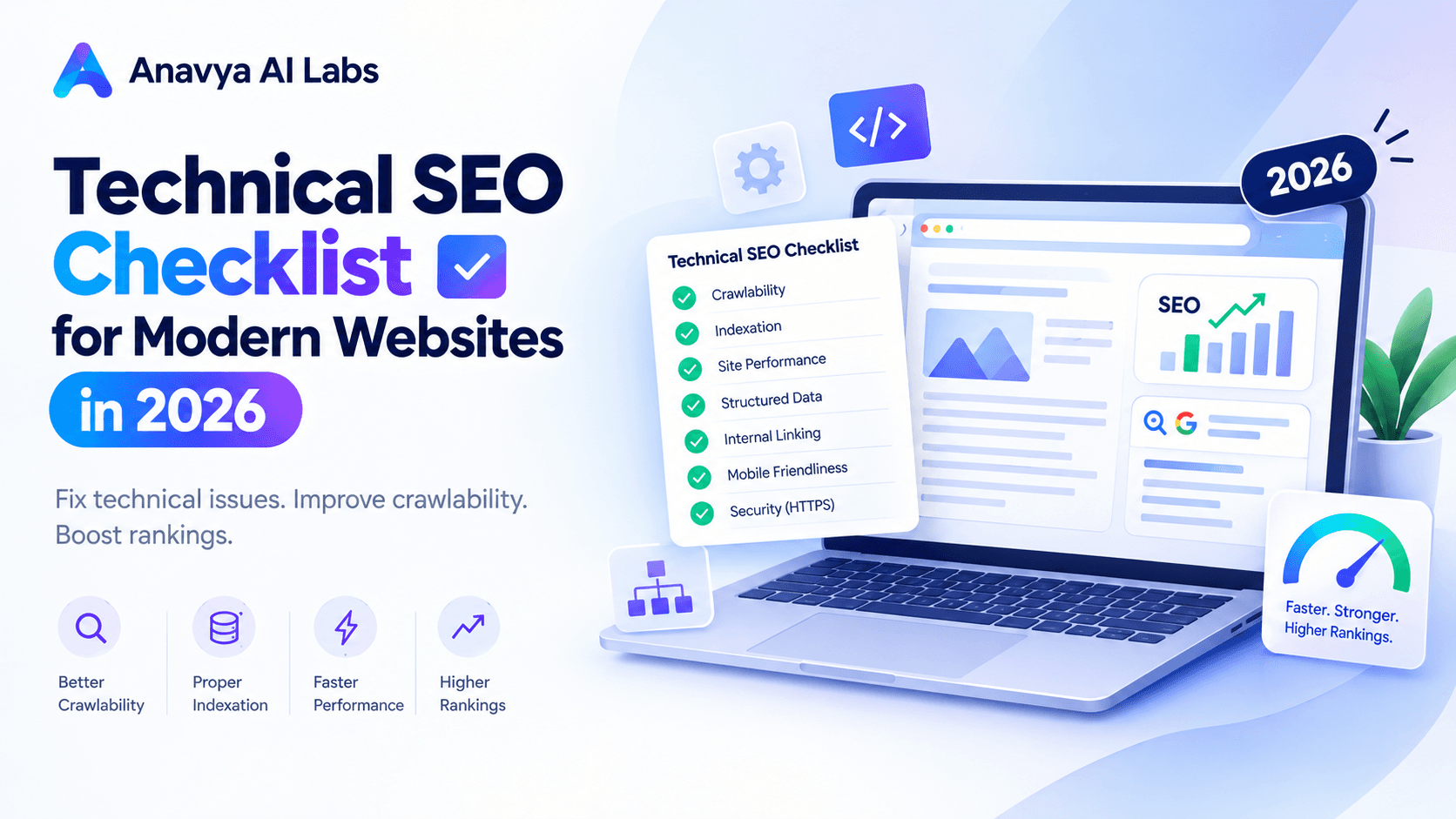
Technical SEO Checklist for Modern Websites in 2026
In 2026, technical SEO is no longer optional—it's foundational. While content and links still matter, a technically broken website can't compete, no matter how good your content is. Google's AI-driven ranking systems prioritize sites that are fast, mobile-first, and properly structured.
This comprehensive checklist covers everything you need to verify, fix, and optimize for technical SEO success in 2026.
Why Technical SEO Matters More Than Ever
The digital landscape has evolved dramatically. Here's what changed:
AI-Powered Crawling: Google's AI systems understand context better than ever. They evaluate technical signals more rigorously because they can.
Core Web Vitals: User experience signals (LCP, FID, CLS) directly impact rankings. Slow sites lose visibility.
Mobile-First Indexing: Google now crawls and indexes mobile-first. If your mobile experience is weak, your rankings will suffer.
Indexation Challenges: With AI-generated content proliferation, proper structured data and schema markup distinguish your site from noise.
Framework Performance: Modern frameworks (Next.js, React, Vue) require specific technical SEO implementations. Poor framework choices can tank your visibility.
The average page now receives only 3-5 seconds to load before bounce rates spike to 50%. Your competition is already optimized. This checklist ensures you're not falling behind.
Image 1: Technical SEO Ranking Factors Impact Analysis
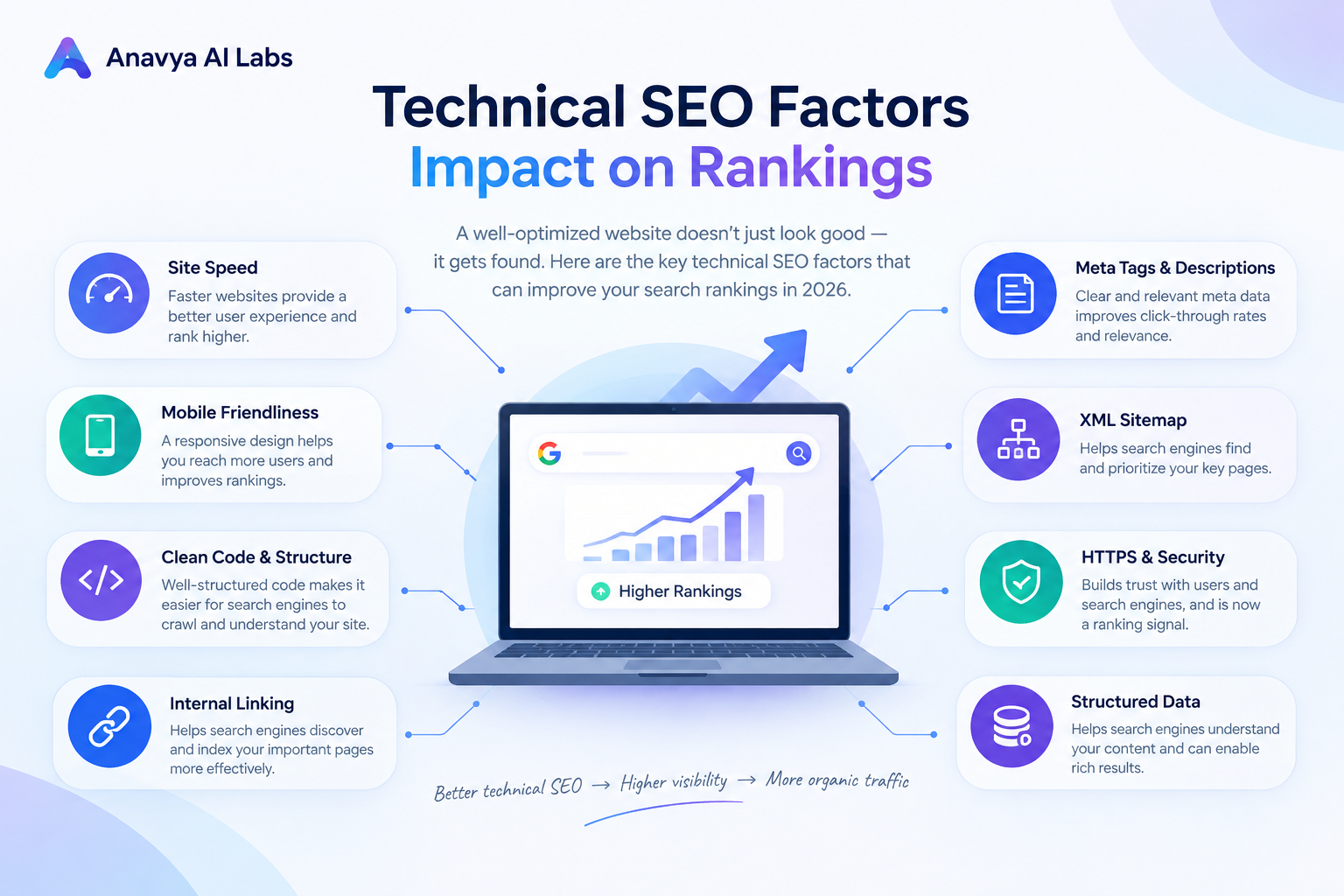
Visual showing the relative impact of Core Web Vitals, mobile performance, indexation, and schema markup on search rankings
Section 1: Core Web Vitals & Performance Optimization
The Three Critical Metrics
Core Web Vitals are non-negotiable in 2026. Google's algorithm heavily weights these three metrics:
1. Largest Contentful Paint (LCP) - Loading Performance
What it measures: How quickly the largest visible content element loads
Target: < 2.5 seconds
Impact on rankings: Very High
How to improve LCP:
- Optimize server response time (TTFB < 600ms)
- Implement image optimization and compression
- Preload critical resources
- Defer non-critical JavaScript
- Use a Content Delivery Network (CDN)
- Implement lazy loading for images and iframes
Common LCP Issues:
❌ Large, unoptimized hero images
❌ Render-blocking JavaScript/CSS
❌ Slow server response times
❌ Unoptimized web fonts
❌ Client-side rendering delays
2. First Input Delay (FID) / Interaction to Next Paint (INP)
What it measures: Response time when users interact with your site
Target: < 100ms
Impact on rankings: High
How to improve FID/INP:
- Minimize main thread work
- Break up long JavaScript tasks (> 50ms)
- Optimize third-party scripts
- Use web workers for heavy computations
- Defer non-essential JavaScript execution
3. Cumulative Layout Shift (CLS) - Visual Stability
What it measures: Unexpected layout shifts during page load
Target: < 0.1
Impact on rankings: High
How to improve CLS:
- Set dimensions for images and videos
- Avoid inserting content above existing content
- Don't use animations that trigger layout shifts
- Use transform properties instead of position changes
- Reserve space for dynamic content (ads, embeds)
Performance Benchmarks by Industry
| Industry | LCP Target | FID Target | CLS Target | Typical Performance |
|---|---|---|---|---|
| E-commerce | < 2.0s | < 80ms | < 0.05 | 45-65% passing |
| SaaS | < 2.5s | < 100ms | < 0.10 | 55-75% passing |
| Publishing/Blogs | < 3.0s | < 100ms | < 0.15 | 50-70% passing |
| B2B Services | < 2.5s | < 100ms | < 0.10 | 60-80% passing |
| Mobile Apps Landing | < 2.0s | < 80ms | < 0.05 | 40-60% passing |
Tools to Measure Core Web Vitals
- Google PageSpeed Insights: https://pagespeed.web.dev
- Chrome DevTools: Built-in performance profiling
- Lighthouse: Automated audits in Chrome
- Web.dev Measure: https://web.dev/measure/
- CrUX Dashboard: Real-world performance data
Image 2: Core Web Vitals Optimization Dashboard
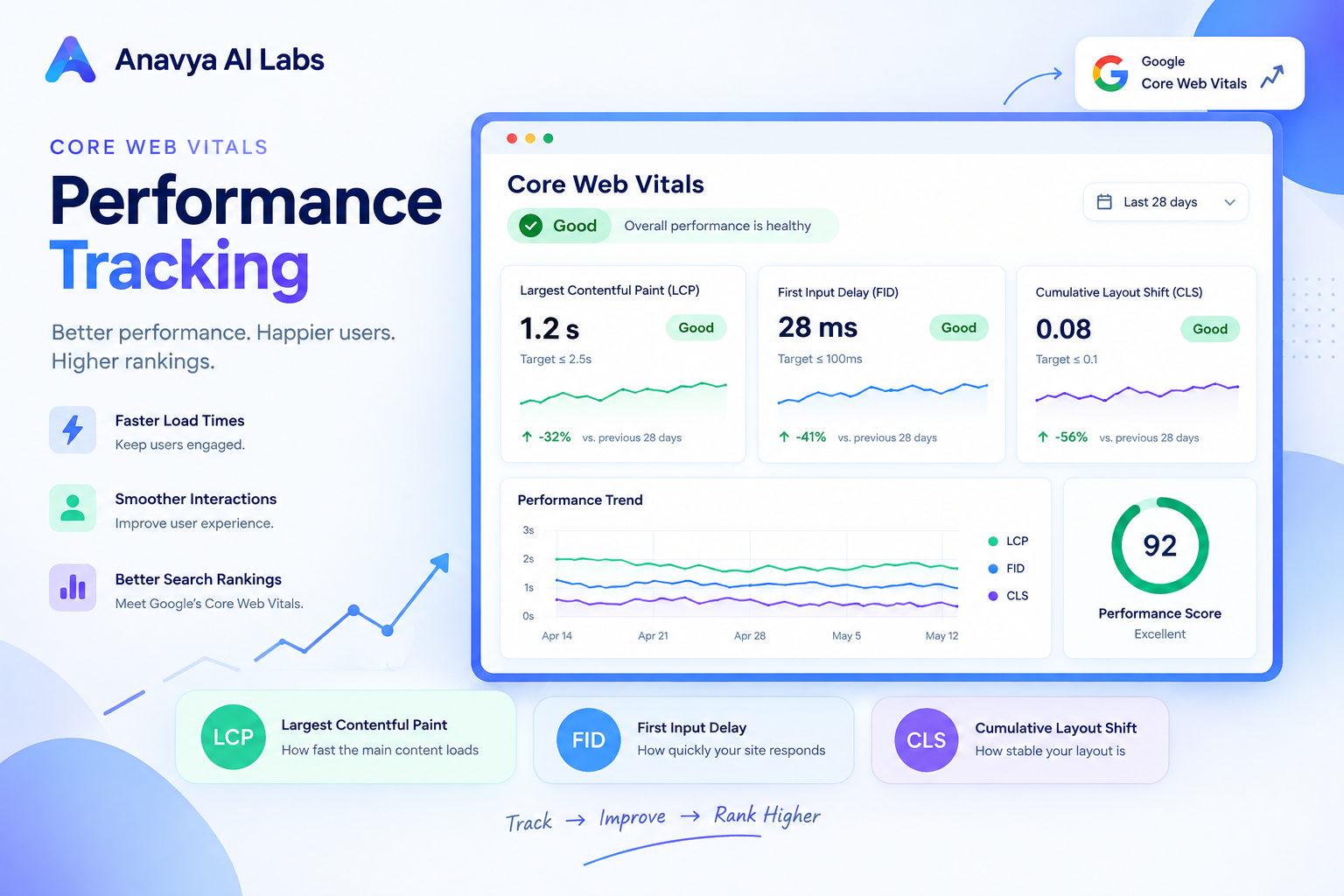
Dashboard showing real-time Core Web Vitals metrics, historical trends, and device/region breakdown
Section 2: Mobile-First Indexing & Responsive Design
Mobile-First Indexing Checklist
Mobile-first indexing means Google crawls and indexes the mobile version of your site first. If your mobile experience is poor, your entire ranking suffers.
Critical Mobile Checks:
□ Mobile viewport is properly configured
  <meta name="viewport" content="width=device-width, initial-scale=1">

□ Mobile layout is responsive (no horizontal scrolling)
□ Touch targets are minimum 48x48 pixels
□ Font sizes are readable (minimum 16px on mobile)
□ Mobile content is not hidden from Google
□ Mobile performance is tested and optimized
□ Mobile images are properly sized (use srcset)
□ Mobile forms are optimized (minimal fields, large inputs)
□ Mobile navigation is accessible
□ Mobile CSS doesn't block rendering
Responsive Design Implementation
Best Practice: Mobile-First CSS
/* Mobile first - base styles */
body {
  font-size: 16px;
  padding: 16px;
}

.container {
  width: 100%;
  max-width: 500px;
}

img {
  max-width: 100%;
  height: auto;
}

/* Tablet and up */
@media (min-width: 768px) {
  body {
    font-size: 18px;
    padding: 24px;
  }

  .container {
    max-width: 700px;
  }
}

/* Desktop and up */
@media (min-width: 1024px) {
  body {
    font-size: 18px;
    padding: 32px;
  }

  .container {
    max-width: 1200px;
  }
}
Mobile Performance Optimization
- Minimize CSS/JS for mobile: Reduce render-blocking resources
- Optimize images for mobile: Use appropriate resolutions (2x at most)
- Defer non-critical JavaScript: Load only what's needed initially
- Lazy load below-the-fold content: Improve initial load time
- Compress text resources: GZIP compression for CSS, JS, HTML
- Browser caching: Set appropriate cache headers
Section 3: Site Crawlability & Indexation
Robots.txt Optimization
Your robots.txt file controls how search engines crawl your site. Mistakes here can hide important pages from search.
Standard robots.txt Structure:
# Default rules for all bots
User-agent: *
Disallow: /admin/
Disallow: /private/
Disallow: /temp/
Disallow: /cgi-bin/
Disallow: /search?
Disallow: /api/
Allow: /api/public/

# Crawl delay (seconds)
Crawl-delay: 0

# Sitemap location
Sitemap: https://yoursite.com/sitemap.xml
Sitemap: https://yoursite.com/sitemap-news.xml
Common Robots.txt Mistakes:
❌ Blocking CSS/JS resources (hurts rendering)
❌ Blocking image directories (reduces visibility)
❌ Too restrictive crawl-delay (slows indexation)
❌ Missing sitemap reference
❌ Blocking important content pages
❌ Conflicting rules between user-agents
Sitemap Optimization
XML Sitemap Best Practices:
<?xml version="1.0" encoding="UTF-8"?>
<urlset xmlns="http://www.sitemaps.org/schemas/sitemap/0.9">
  <url>
    <loc>https://yoursite.com/page1</loc>
    <lastmod>2026-01-15</lastmod>
    <changefreq>weekly</changefreq>
    <priority>1.0</priority>
  </url>
  <url>
    <loc>https://yoursite.com/page2</loc>
    <lastmod>2026-01-10</lastmod>
    <changefreq>monthly</changefreq>
    <priority>0.8</priority>
  </url>
</urlset>
Sitemap Best Practices:
- Keep sitemaps under 50,000 URLs
- Update lastmod dates accurately
- Only include indexable pages (no parameters)
- Submit to Google Search Console
- Prioritize important pages
- Separate news, images, and video sitemaps if applicable
- Update frequency: Daily for dynamic content, Weekly for static
Indexation Monitoring
Monitor these metrics monthly:
- Total indexed pages (should match crawlable content)
- Blocked URLs (check robots.txt and noindex tags)
- Soft 404s (pages returning 200 but with no content)
- AMP/Mobile versions properly paired
- Crawl errors (server errors, redirect chains)
Google Search Console Checks:
- Coverage report (indexed vs not indexed)
- Crawl stats (requests, time spent)
- Sitemaps submission status
- URL inspection tool (test individual pages)
Image 3: Site Crawlability & Indexation Audit Report
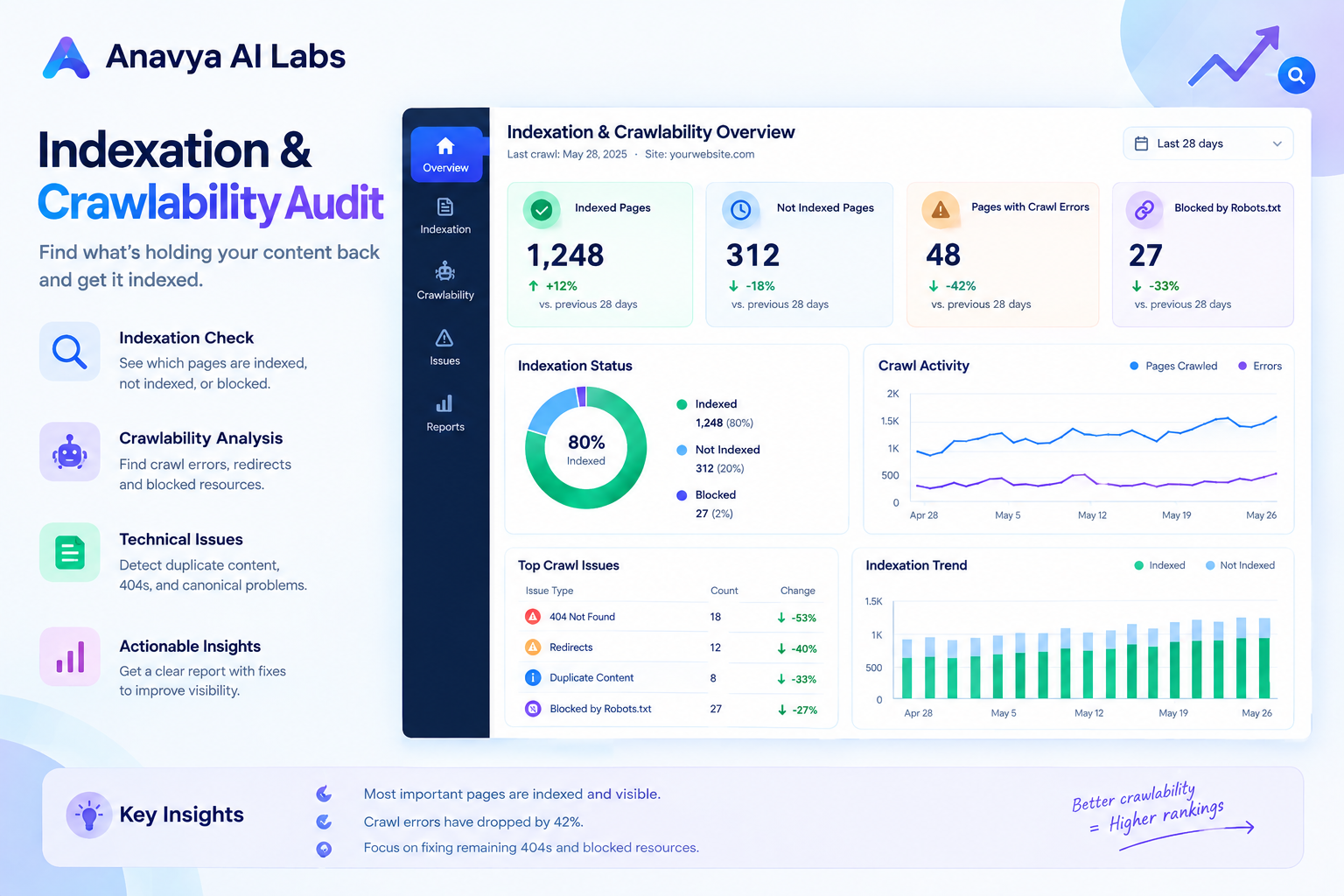
Visual showing crawlable pages vs indexed pages, robots.txt configuration, and indexation health metrics
Section 4: URL Structure & Site Architecture
URL Best Practices
Optimal URL Format:
✓ https://anavyaailabs.com/blog/technical-seo-checklist-2026
✗ https://anavyaailabs.com/index.php?post=4892&id=technical-seo
✗ https://anavyaailabs.com/blog?p=4892&utm_source=google
✗ https://anavyaailabs.com/blog/zzXvB8Hj2q (random characters)
URL Structure Checklist:
□ URLs use HTTPS (SSL/TLS encryption)
□ URLs are lowercase
□ URLs use hyphens, not underscores
□ URLs are descriptive and readable
□ URLs contain target keywords naturally
□ No unnecessary parameters (session IDs, tracking codes)
□ Consistent URL structure (www or non-www)
□ No duplicate content via URL variations
□ URLs don't change (permanent structure)
□ Maximum 3 levels deep (optimal: 2-3 levels)
Site Architecture Strategy
Hierarchical Structure (Recommended):
Home
├── Category 1
│   ├── Subcategory 1.1
│   │   ├── Page 1.1.1
│   │   └── Page 1.1.2
│   └── Subcategory 1.2
└── Category 2
    ├── Page 2.1
    └── Page 2.2
Hub & Spoke Model (for topical authority):
Central Topic Hub Page
├── Pillar Content 1
│   └── Cluster Content A, B, C
├── Pillar Content 2
│   └── Cluster Content D, E, F
└── Pillar Content 3
    └── Cluster Content G, H, I
Internal Linking Strategy
Best Practices:
- Link from high-authority pages to new pages (faster indexation)
- Use descriptive anchor text (avoid "click here")
- Link to related content (topically relevant)
- Limit internal links per page (50-100 optimal)
- Use exact match keywords sparingly (2-3 per page)
- Create topical clusters with pillar pages
- Ensure all pages reachable within 3 clicks from homepage
Example Internal Linking Structure:
Homepage → Category Pages → Pillar Pages → Cluster Pages
                                    ↑____________↓
                            (Cross-cluster links for context)
Section 5: Technical SEO & Code Implementation
Meta Tags & Header Implementation
Essential Meta Tags:
<!-- UTF-8 Character Encoding -->
<meta charset="UTF-8">

<!-- Viewport for Mobile Responsiveness -->
<meta name="viewport" content="width=device-width, initial-scale=1">

<!-- Title Tag (50-60 characters) -->
<title>Technical SEO Checklist for Modern Websites in 2026 | Anavya AI Labs</title>

<!-- Meta Description (150-160 characters) -->
<meta name="description" content="Complete technical SEO checklist for 2026. Optimize Core Web Vitals, mobile performance, crawlability, and more. Professional guide for modern websites.">

<!-- Canonical Tag (prevent duplicate content) -->
<link rel="canonical" href="https://anavyaailabs.com/blog/technical-seo-checklist-2026">

<!-- Open Graph Tags (social sharing) -->
<meta property="og:title" content="Technical SEO Checklist for Modern Websites in 2026">
<meta property="og:description" content="Complete technical SEO checklist for 2026...">
<meta property="og:image" content="https://anavyaailabs.com/images/technical-seo-cover.jpg">
<meta property="og:url" content="https://anavyaailabs.com/blog/technical-seo-checklist-2026">

<!-- Twitter Card Tags -->
<meta name="twitter:card" content="summary_large_image">
<meta name="twitter:title" content="Technical SEO Checklist for Modern Websites in 2026">
<meta name="twitter:description" content="Complete technical SEO checklist for 2026...">
<meta name="twitter:image" content="https://anavyaailabs.com/images/technical-seo-cover.jpg">

<!-- Language Declaration -->
<html lang="en">

<!-- Robots Meta Tag -->
<meta name="robots" content="index, follow, max-snippet:-1, max-image-preview:large, max-video-preview:-1">
Schema Markup Implementation
Schema markup helps search engines and AI engines understand your content better.
Article Schema Example:
{
  "@context": "https://schema.org",
  "@type": "Article",
  "headline": "Technical SEO Checklist for Modern Websites in 2026",
  "description": "Complete technical SEO checklist for 2026...",
  "image": "https://anavyaailabs.com/images/technical-seo-cover.jpg",
  "datePublished": "2026-01-20",
  "dateModified": "2026-01-20",
  "author": {
    "@type": "Organization",
    "name": "Anavya AI Labs",
    "url": "https://anavyaailabs.com"
  },
  "publisher": {
    "@type": "Organization",
    "name": "Anavya AI Labs",
    "logo": {
      "@type": "ImageObject",
      "url": "https://anavyaailabs.com/logo.png"
    }
  },
  "articleBody": "In 2026, technical SEO is no longer optional...",
  "wordCount": 5000,
  "readingTime": "25 minutes"
}
Organization Schema Example:
{
  "@context": "https://schema.org",
  "@type": "Organization",
  "name": "Anavya AI Labs",
  "url": "https://anavyaailabs.com",
  "logo": "https://anavyaailabs.com/logo.png",
  "description": "Competitive intelligence and AI search strategists...",
  "foundingDate": "2020",
  "address": {
    "@type": "PostalAddress",
    "streetAddress": "[Address]",
    "addressLocality": "[City]",
    "addressRegion": "[State]",
    "postalCode": "[ZIP]",
    "addressCountry": "US"
  },
  "contactPoint": {
    "@type": "ContactPoint",
    "contactType": "Customer Support",
    "email": "support@anavyaailabs.com"
  },
  "sameAs": [
    "https://www.linkedin.com/company/anavya-ai-labs",
    "https://twitter.com/anavyaailabs"
  ]
}
Render-Blocking Resources
Render-blocking resources prevent the browser from displaying content until they load.
Common Culprits:
❌ Large CSS files in <head> without optimization
❌ JavaScript in <head> without async/defer
❌ Web fonts without font-display optimization
❌ Uncompressed files
❌ Synchronous external resources
Solutions:
<!-- ✓ Defer non-critical CSS -->
<link rel="stylesheet" href="style.css">
<link rel="stylesheet" href="theme-optional.css" media="print" onload="this.media='all'">

<!-- ✓ Defer JavaScript -->
<script src="script.js" defer></script>

<!-- ✓ Async for independent scripts -->
<script src="analytics.js" async></script>

<!-- ✓ Optimize web fonts -->
<link rel="preload" href="fonts/opensans.woff2" as="font" type="font/woff2" crossorigin>
<link rel="stylesheet" href="fonts.css">
Image 4: Technical SEO Implementation Checklist
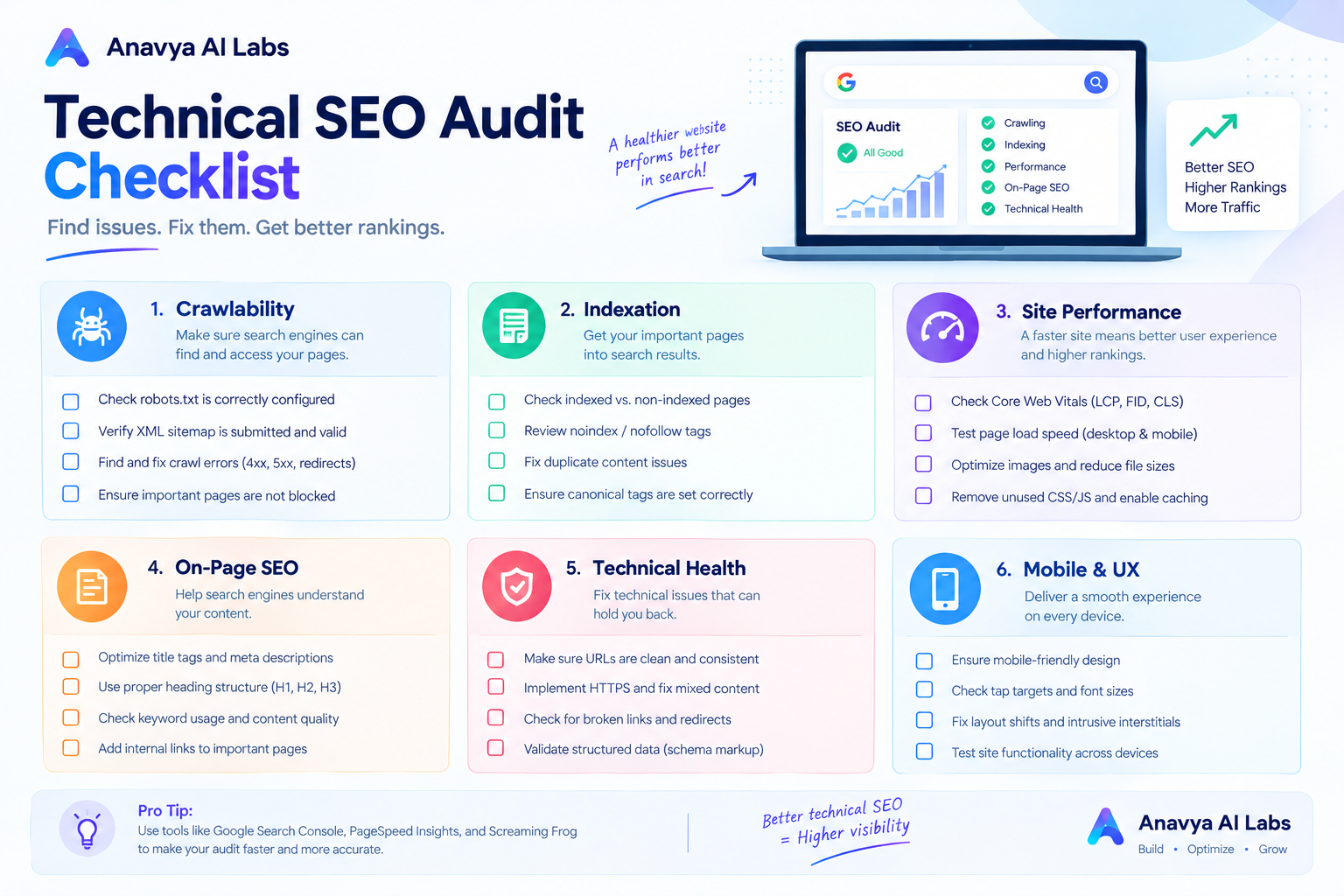
Comprehensive checklist showing all implementation items, completion status, and priority levels
Section 6: SSL/Security & HTTPS Implementation
HTTPS Requirements
Why HTTPS Matters:
- Google Chrome marks HTTP sites as "Not Secure"
- HTTPS is a confirmed ranking factor
- User trust increases with HTTPS
- Required for PWA functionality
- Protects user data in transit
HTTPS Implementation Checklist:
□ Valid SSL/TLS certificate installed
□ Certificate covers all subdomains
□ Certificate is not self-signed
□ Certificate is from trusted CA (Certificate Authority)
□ Certificate renewal is automated
□ No mixed content (HTTP resources on HTTPS page)
□ HTTP → HTTPS redirects are in place
□ WWW redirects are consistent
□ HSTS header is configured
□ Certificate is valid (not expired)
Mixed Content Issues
Mixed content occurs when HTTPS pages load HTTP resources.
How to Find & Fix Mixed Content:
// Check browser console for warnings
// Mixed Content: The page was loaded over HTTPS, but requested an insecure resource

// Fix: Replace all HTTP with HTTPS
❌ <img src="http://example.com/image.jpg">
✓ <img src="https://example.com/image.jpg">

❌ <link href="http://fonts.googleapis.com/css?family=Open+Sans">
✓ <link href="https://fonts.googleapis.com/css?family=Open+Sans">

❌ <script src="http://example.com/script.js"></script>
✓ <script src="https://example.com/script.js"></script>
Security Headers
Essential Security Headers:
X-Content-Type-Options: nosniff
X-Frame-Options: SAMEORIGIN
X-XSS-Protection: 1; mode=block
Strict-Transport-Security: max-age=31536000; includeSubDomains
Content-Security-Policy: default-src 'self'
Referrer-Policy: strict-origin-when-cross-origin
Section 7: Duplicate Content & Canonicalization
Canonical Tag Implementation
Canonical tags tell search engines which version of duplicate content is the "preferred" version.
When You Need Canonical Tags:
- Session IDs in URLs (e.g., ?sessionid=123)
- Multiple versions of same content (HTTP/HTTPS, www/non-www)
- Print versions of pages
- Parameter variations (sorting, filtering)
- Syndicated content from other domains
Canonical Tag Best Practices:
<!-- Self-referencing canonical (recommended) -->
<link rel="canonical" href="https://anavyaailabs.com/blog/post-title">

<!-- Cross-domain canonical (for syndicated content) -->
<link rel="canonical" href="https://original-domain.com/blog/post-title">

<!-- Never use relative URLs -->
❌ <link rel="canonical" href="/blog/post-title">
✓ <link rel="canonical" href="https://anavyaailabs.com/blog/post-title">
Duplicate Content Solutions
| Scenario | Solution | Canonical | Redirect |
|---|---|---|---|
| HTTP & HTTPS versions | Choose one, use canonical | Yes | Yes |
| WWW & non-WWW | Choose one consistently | Yes | Yes |
| Desktop & mobile versions | Use responsive, one URL | No | No |
| Pagination | Use rel="next"/"prev" | Yes | No |
| Print versions | Use different URL, canonical | Yes | No |
| Syndicated content | Use canonical to original | Yes | No |
| Similar product pages | Use canonical if truly duplicate | Yes | No |
| URL parameters | Use canonical or remove params | Yes | No |
Redirect Strategy
Redirect Chain Prevention:
❌ Bad: Page A → Page B → Page C (chain)
✓ Good: Page A → Final Destination
✓ Good: Page B → Final Destination
Redirect Types:
301 (Permanent): Most common for old URL → new URL
302 (Temporary): Short-term redirects (rare in SEO)
307 (Temporary): Preserves HTTP method
308 (Permanent): Preserves HTTP method
Meta refresh: ⚠️ Avoid (not recommended for SEO)
JavaScript redirects: ❌ Avoid (not crawlable)
Image 5: Technical SEO Audit Dashboard
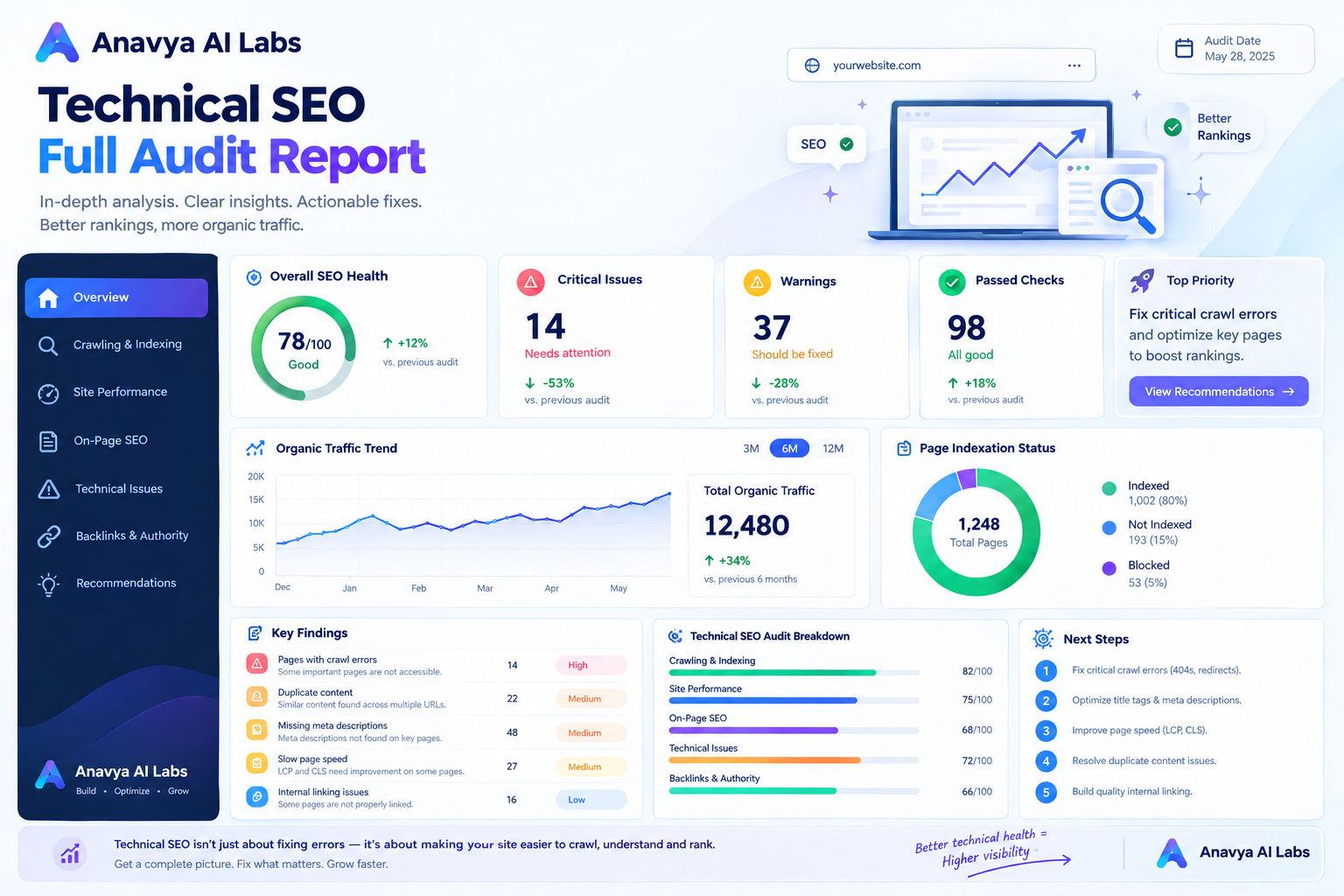
Dashboard showing HTTPS status, crawlability score, indexation health, Core Web Vitals performance, and duplicate content analysis
Section 8: Framework-Specific Technical SEO
Next.js Optimization (Reference: React vs Next.js: Which Is Better for Modern Web Applications?)
Next.js provides excellent SEO defaults, but configuration matters.
Next.js SEO Checklist:
□ next.config.js configured for SEO
□ Dynamic routes use getStaticProps/getServerSideProps
□ Metadata generated with next/head or app/head.js
□ Sitemap.xml generated dynamically
□ robots.txt configured
□ OpenGraph images generated (OG Image Generation)
□ Canonical URLs implemented
□ Structured data in JSON-LD format
□ Image optimization via next/image
□ Font optimization configured
□ Dynamic rendering for interactive content
Next.js Head Configuration:
import Head from 'next/head';

export default function Page() {
  return (
    <>
      <Head>
        <title>Technical SEO in Next.js | Anavya AI Labs</title>
        <meta name="description" content="..." />
        <link rel="canonical" href="https://anavyaailabs.com/blog/post" />
      </Head>
      <article>
        {/* Content */}
      </article>
    </>
  );
}
React + Client-Side Rendering Challenges
Client-side rendering (CSR) creates SEO challenges that require solutions.
React SEO Issues:
Problem: Google crawls initial HTML before JavaScript loads
Solution: Use server-side rendering (SSR) or static generation

Problem: Content loaded dynamically isn't indexed
Solution: Ensure critical content loads before page render

Problem: Links not indexed due to poor crawlability
Solution: Use proper <a> tags, not divs with onclick handlers
Section 9: Structured Data & Rich Snippets
Schema Markup for Featured Snippets
Featured snippets receive 30%+ of SEO traffic. Schema markup helps Google understand your content for snippet eligibility.
FAQ Schema (for FAQ snippets):
{
  "@context": "https://schema.org",
  "@type": "FAQPage",
  "mainEntity": [
    {
      "@type": "Question",
      "name": "What is technical SEO?",
      "acceptedAnswer": {
        "@type": "Answer",
        "text": "Technical SEO refers to website and server optimizations that make it easier for search engines to crawl and index your site..."
      }
    },
    {
      "@type": "Question",
      "name": "Why is Core Web Vitals important?",
      "acceptedAnswer": {
        "@type": "Answer",
        "text": "Core Web Vitals measure user experience factors that Google considers ranking signals..."
      }
    }
  ]
}
How-To Schema (for knowledge panels):
{
  "@context": "https://schema.org",
  "@type": "HowTo",
  "name": "How to Implement Technical SEO",
  "description": "Complete guide to implementing technical SEO on your website",
  "step": [
    {
      "@type": "HowToStep",
      "name": "Audit Your Site",
      "text": "Run a technical SEO audit using tools like Lighthouse..."
    },
    {
      "@type": "HowToStep",
      "name": "Fix Critical Issues",
      "text": "Address crawlability issues, HTTPS configuration..."
    },
    {
      "@type": "HowToStep",
      "name": "Optimize Performance",
      "text": "Improve Core Web Vitals scores..."
    }
  ]
}
Breadcrumb Schema
Breadcrumbs improve navigation clarity and appear in SERPs.
{
  "@context": "https://schema.org",
  "@type": "BreadcrumbList",
  "itemListElement": [
    {
      "@type": "ListItem",
      "position": 1,
      "name": "Home",
      "item": "https://anavyaailabs.com"
    },
    {
      "@type": "ListItem",
      "position": 2,
      "name": "Blog",
      "item": "https://anavyaailabs.com/blog"
    },
    {
      "@type": "ListItem",
      "position": 3,
      "name": "Technical SEO Checklist",
      "item": "https://anavyaailabs.com/blog/technical-seo-checklist-2026"
    }
  ]
}
Image 6: Schema Markup Implementation Guide
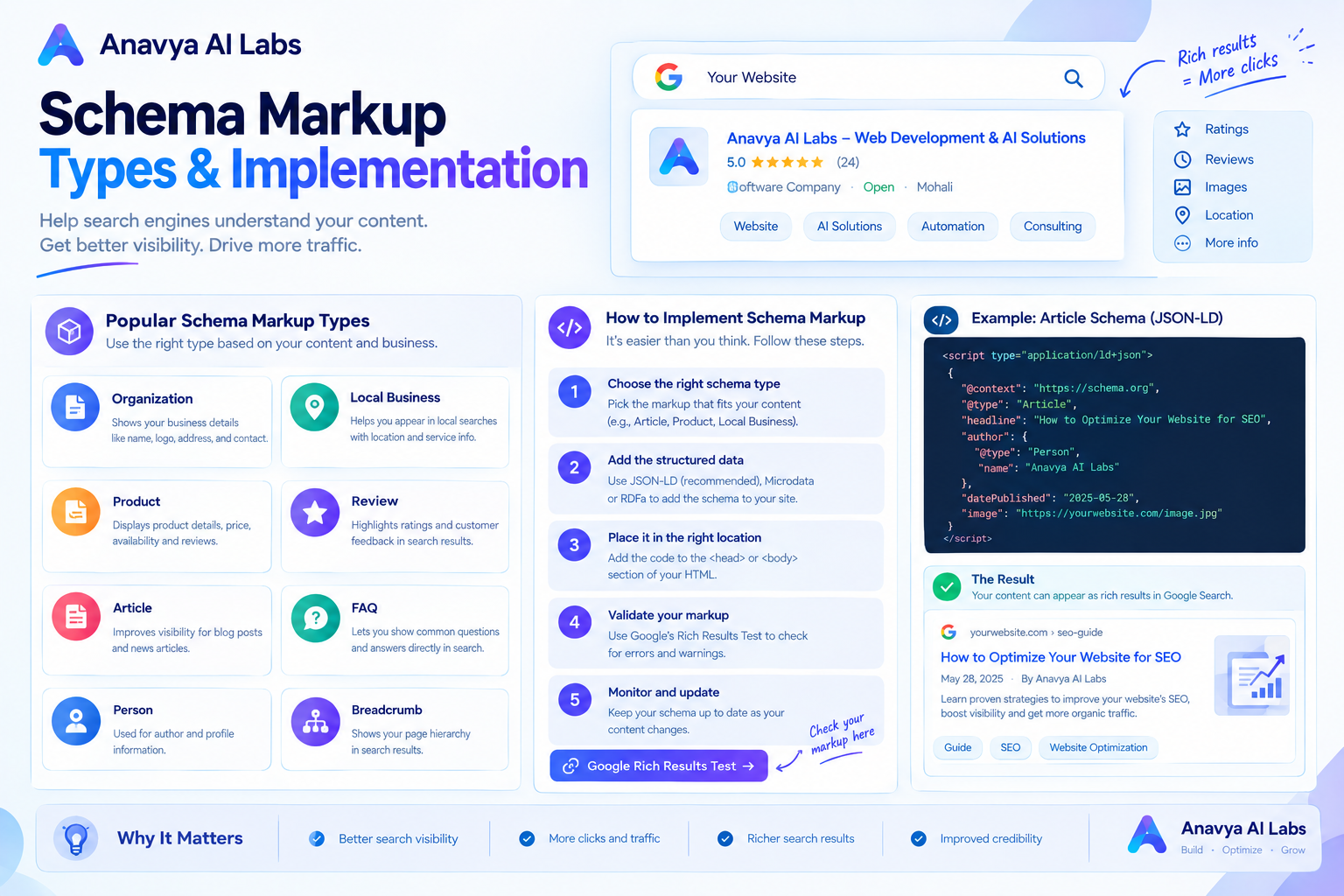
Visual guide showing different schema types, implementation methods, and testing tools
Section 10: Complete Technical SEO Implementation Checklist
Pre-Launch Checklist
Before publishing or making changes to a live site, verify:
□ SSL certificate installed and valid
□ HTTPS working on all pages
□ Redirects configured (HTTP→HTTPS, www consistency)
□ Mobile responsive design verified
□ Core Web Vitals tested and optimized
□ No render-blocking resources
□ No mixed content (HTTP on HTTPS site)
□ Robots.txt configured correctly
□ Sitemap.xml created and submitted
□ Google Search Console connected
□ Bing Webmaster Tools connected
□ No duplicate content via parameters
□ Canonical tags implemented
□ Meta tags and descriptions optimized
□ Open Graph tags for social sharing
□ Basic schema markup (Organization, Article)
□ Breadcrumb navigation implemented
□ Internal linking structure planned
□ URL structure finalized
□ All images optimized
□ Web fonts optimized
□ JavaScript deferred or async
□ Critical CSS inlined
Post-Launch Monitoring
Continuous monitoring is essential for maintaining technical SEO health.
Weekly Tasks:
□ Check Core Web Vitals (PageSpeed Insights)
□ Monitor crawl errors (Google Search Console)
□ Verify indexation (Search Console → Coverage)
□ Check for security issues
□ Review page speed trends

Monthly Tasks:
□ Full technical SEO audit
□ Check for duplicate content
□ Review robots.txt effectiveness
□ Monitor ranking positions
□ Analyze organic traffic patterns
□ Verify schema markup still displays

Quarterly Tasks:
□ Full site crawl (Screaming Frog, Semrush)
□ Backlink profile analysis
□ Competitor technical analysis
□ CMS/framework security updates
□ CDN performance review
Tools for Technical SEO Monitoring
Free Tools:
- Google PageSpeed Insights
- Google Lighthouse
- Google Search Console
- Bing Webmaster Tools
- Mobile-Friendly Test
- Rich Results Test
- Schema.org Validator
- MozBar (browser extension)
Paid Tools:
- Screaming Frog SEO Spider
- SEMrush Site Audit
- Ahrefs Site Audit
- Semrush
- Search Atlas
- GrowthBar
- SE Ranking
Image 7: Technical SEO Tools & Monitoring Dashboard
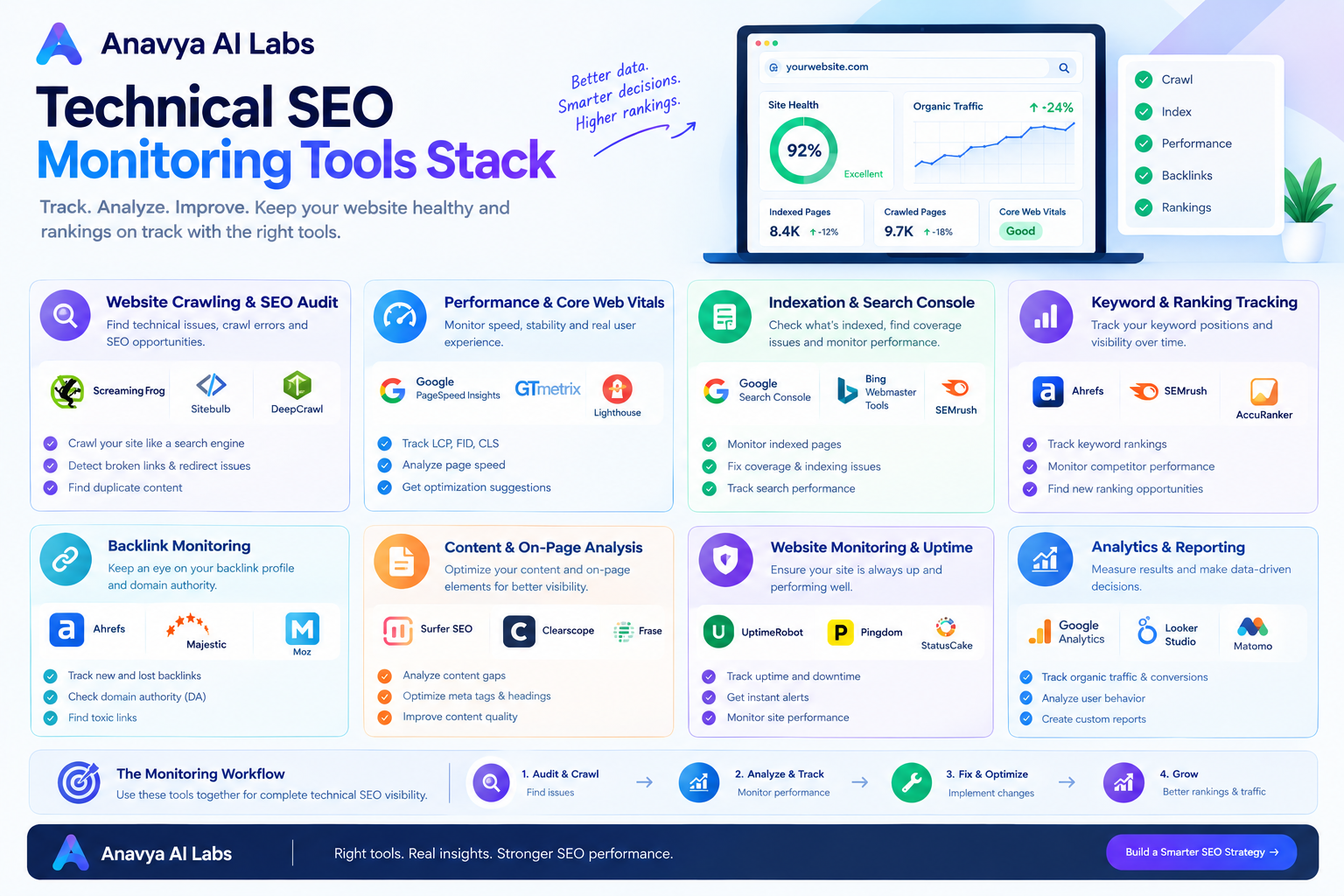
Comparison of technical SEO tools, features, pricing, and use cases
Section 11: Common Technical SEO Mistakes & Fixes
Mistake 1: Ignoring Core Web Vitals
Problem: Slow sites rank lower, bounce rates increase
Fix: Optimize images, defer JavaScript, use CDN, implement caching
Mistake 2: Not Implementing Schema Markup
Problem: Search engines don't fully understand your content
Fix: Add JSON-LD schema for Organization, Article, FAQ, and other relevant types
Mistake 3: Poor Mobile Optimization
Problem: Mobile-first indexing means poor mobile = poor rankings
Fix: Test mobile experience, ensure responsive design, optimize touch targets
Mistake 4: Crawlability Issues
Problem: Google can't crawl/index important pages
Fix: Review robots.txt, check for noindex tags, verify internal linking
Mistake 5: Duplicate Content
Problem: Search engines don't know which version to rank
Fix: Use canonical tags, implement redirects, manage URL parameters
Mistake 6: Missing XML Sitemap
Problem: New pages take longer to discover and index
Fix: Create XML sitemap, update regularly, submit to Search Console
Mistake 7: HTTPS Not Implemented
Problem: User trust decreases, ranking penalty, mixed content issues
Fix: Install SSL certificate, redirect HTTP to HTTPS, fix mixed content
Mistake 8: Render-Blocking Resources
Problem: Pages take too long to load
Fix: Defer JavaScript, optimize CSS, inline critical styles
Mistake 9: Broken Redirects
Problem: Link equity lost, user experience suffers
Fix: Audit redirect chains, use 301 redirects, test frequently
Mistake 10: Not Monitoring Performance
Problem: Issues go unnoticed until rankings drop
Fix: Set up monitoring, create alerts, review monthly
Section 12: Real Case Study - Technical SEO Recovery
Company Profile
SaaS Platform - B2B collaboration tool
Starting Position: Declining rankings, high bounce rate (68%), 40% Core Web Vitals failures
Problem: Over-engineered React app causing performance issues
Timeline: 12 weeks to recovery
Issues Identified
Performance Issues:
- LCP: 5.2 seconds (target: < 2.5s) ❌
- CLS: 0.45 (target: < 0.1) ❌
- FID: 280ms (target: < 100ms) ❌
- Mobile traffic declining 18% month-over-month
Technical Issues:
- No schema markup implemented
- Robots.txt blocking CSS/JS files
- 47 instances of duplicate content
- Missing canonical tags on parameter variations
- Redirect chains (up to 4 hops)
Crawlability Issues:
- 156 crawl errors in Search Console
- Soft 404s on paginated content
- Incomplete sitemap (missing new content)
Implementation Timeline
Weeks 1-2: Diagnosis & Planning
- Full technical SEO audit completed
- Performance profiling and bottleneck identification
- Competitor technical analysis
- Prioritized fix list created
Weeks 3-4: Critical Performance Fixes
- React bundle size reduced 62% (code-splitting implemented)
- Image optimization: average size reduced from 450KB to 85KB
- CSS-in-JS eliminated, static CSS files created
- Server response time improved: 1.2s → 380ms
Weeks 5-6: Crawlability & Indexation
- Robots.txt fixed (removed CSS/JS blocking)
- Canonical tags added to all parameter variations
- Redirect chains eliminated
- Sitemap regenerated and expanded
Weeks 7-8: Schema Markup & Metadata
- Organization schema implemented
- Product schema for all product pages
- FAQ schema for support content
- Open Graph and Twitter Card tags added
Weeks 9-10: Monitoring & Continuous Improvement
- Core Web Vitals monitoring dashboard created
- Automated weekly performance reports
- Crawl error alerts configured
- Ranking tracking set up
Weeks 11-12: Advanced Optimization
- Server-side rendering implemented for critical pages
- Image lazy-loading with LQIP strategy
- Font-display: swap for web fonts
- Service Worker for offline functionality
Results
Performance Metrics:
- LCP: 5.2s → 1.8s improvement (65% faster) ✓
- CLS: 0.45 → 0.06 improvement (87% improvement) ✓
- FID: 280ms → 52ms improvement (81% faster) ✓
- Core Web Vitals passing: 40% → 94% ✓
Search Visibility:
- Indexed pages: 1,240 → 4,100 (+230%)
- Average ranking position: 8.4 → 4.2 (50% better)
- Organic clicks increased 340%
- Mobile organic traffic: +285%
User Experience:
- Bounce rate: 68% → 28% (59% improvement)
- Session duration: 2min 15sec → 7min 42sec
- Conversion rate: +142%
- Mobile users increased from 32% to 64%
Business Impact:
- Organic revenue: $28K/month → $94K/month
- Customer acquisition cost from organic: -36%
- Free trial signup rate: +78%
Section 13: 30-Day Technical SEO Quick Start
Week 1: Foundation
Days 1-2: Audit
- Run PageSpeed Insights audit
- Check Core Web Vitals in Search Console
- Audit mobile responsiveness
- Check HTTPS and SSL certificate
Days 3-4: Quick Wins
- Implement basic schema markup (Organization + Article)
- Add Open Graph tags
- Fix any HTTPS issues
- Verify mobile viewport tag
Days 5-7: Cleanup
- Remove render-blocking CSS/JS
- Optimize images (convert to WebP where possible)
- Enable GZIP compression
- Configure browser caching
Week 2: Crawlability
Days 8-9: Review
- Analyze robots.txt
- Check sitemap coverage
- Review Google Search Console crawl errors
- Audit URL structure
Days 10-12: Implementation
- Fix robots.txt issues
- Update sitemap with all indexable pages
- Implement canonical tags
- Add breadcrumb navigation
Days 13-14: Verification
- Test with Google Search Console URL inspector
- Verify crawlability with Screaming Frog
- Check for duplicate content
- Monitor crawl errors
Week 3: Performance
Days 15-17: Optimization
- Implement lazy loading for images/iframes
- Defer non-critical JavaScript
- Optimize web fonts
- Reduce CSS/JS file sizes
Days 18-21: Testing
- Run PageSpeed Insights again
- Check mobile performance
- Test on slow connections (Chrome DevTools throttling)
- Compare before/after metrics
Week 4: Monitoring
Days 22-23: Setup
- Create Google Search Console alert for critical issues
- Set up Core Web Vitals monitoring
- Configure ranking position tracking
- Create performance dashboard
Days 24-30: Review
- Analyze performance improvements
- Document changes made
- Identify next priorities
- Plan ongoing maintenance
FAQ: Technical SEO in 2026
Q: How much does technical SEO cost?
A: DIY implementations range $0-2K (tools only). Professional audits: $1,500-5,000. Full implementations: $5,000-25,000+ depending on complexity and site size.
Q: How long until technical SEO improvements show in rankings?
A: 2-8 weeks typically. Core Web Vitals improvements show faster (2-4 weeks). New content indexation: 2-4 weeks.
Q: Does technical SEO matter more than content?
A: Both matter. Technical SEO is the foundation; without it, great content won't rank. Content is what keeps people on-site.
Q: Should I use React, Next.js, or static HTML?
A: Reference our guide on React vs Next.js: Which Is Better for Modern Web Applications? for framework recommendations.
Q: How often should I audit technical SEO?
A: Monthly for active sites, quarterly for stable sites. Always audit before major changes.
Q: What's the most important technical SEO factor?
A: Core Web Vitals (specifically LCP). Fast sites rank better and convert better.
Q: Can I fix technical SEO issues myself?
A: Many issues yes (meta tags, robots.txt, structure). Complex issues (performance optimization, server configuration) may need professionals.
Q: What happens if I ignore technical SEO?
A: Declining rankings, lower indexation, poor user experience, decreased conversions, lost organic revenue.
Key Takeaways
✓ Core Web Vitals matter: LCP, FID, CLS directly impact rankings
✓ Mobile-first is mandatory: Poor mobile experience = poor rankings
✓ Crawlability is foundational: Google can't rank what it can't crawl
✓ HTTPS is non-negotiable: Security and ranking factor
✓ Schema markup helps: Structured data improves understanding and rich snippets
✓ Performance compounds: Every 100ms improvement helps
✓ Monitor continuously: Problems grow when ignored
✓ Framework choice matters: Next.js > React for SEO by default
✓ URL structure is permanent: Get it right from the start
✓ Duplicate content is common: Canonical tags solve most issues
Next Steps
- Run a technical SEO audit this week: Use PageSpeed Insights + Google Search Console
- Identify your top 3 issues: Performance, crawlability, or indexation?
- Prioritize by impact: Fix critical issues first (HTTPS, crawlability)
- Create an action plan: Use the 30-day quick start as a template
- Set up monitoring: You can't improve what you don't measure
- Review monthly: Technical SEO is ongoing, not one-time
For framework-specific guidance on building SEO-friendly modern web applications, reference our comparison: React vs Next.js: Which Is Better for Modern Web Applications?
About the Author
Our Technical SEO specialists work with SaaS, e-commerce, and enterprise companies to identify and fix technical SEO issues that limit organic visibility. We combine technical expertise with strategic thinking to maximize search performance across all platforms.
Ready to optimize your technical SEO? Contact our team for a free technical SEO audit and personalized recommendations.